 Domain SearchSecure your perfect UAE domain in seconds.
 Domain TransferSeamless domain transfer. Zero downtime, complete control.
 All TLDsSecure your ideal domain. Explore local UAE and international extensions.
 WHOIS LOOKUPCheck domain ownership, expiry dates, and registrar details instantly.
 AE DomainRegister a .AE domain and build trust in the UAE.
 SSL CertificatesProtect your site with trusted SSL Certificates to secure data and build customer confidence.
 .com DomainGet the world’s most trusted domain and build credibility from day one.
 Web hostingFind budget-friendly hosting that doesn’t compromise on performance.
 Windows HostingHigh-performance hosting for Windows applications and websites.
 Affiliate ProgramBecome a partner and earn commission for every referral.
 WordPress HostingBlazing-Fast WordPress Hosting, Optimised for Performance.
 Email HostingSecure your communications with professional email hosting. Use your domain, stay in control.
 Reseller HostingLaunch your own hosting brand. We handle the tech, you grow your business.
 cPanel HostingHosting supported by cPanel (simple and user-friendly)
 VPS HostingVirtual servers that grow with you. Full root access. Blazing fast performance.
 Managed VPS HostingNot a tech expert? Let us handle everything with our fully managed VPS hosting.
 Dedicated ServersEnjoy full access and total control over your dedicated physical server.
 AI Website BuilderBuild beautiful websites instantly with AI.
 Online ShopCreate a professional online store. No coding needed.
 Web Design ServicesGet a custom website built for your brand and your goals.
 BlogDiscover resources on web hosting, e-commerce, digital marketing, and beyond.
 Contact UsWe are available 24/7 via chat or email
 SupportExplore guides and answers for all our services

Are you wondering if it’s safe to flush DNS on your computer? You’re not alone in this concern. Millions of users across the globe grapple with connectivity issues daily, and DNS flushing often comes up as a potential solution.
Before we dive deeper, if you’re experiencing persistent DNS issues or need reliable hosting solutions, TrueHost Cloud offers premium DNS management services that can help streamline your online experience. Their global infrastructure ensures optimal performance whether you’re in New York or Nairobi.
Let me put your mind at ease right away: flushing your DNS cache is generally safe and won’t harm your computer. However, there’s more to this story than a simple yes or no answer.
What Exactly Is DNS Flushing?
Think of DNS cache as your computer’s personal phone book. Just like you might jot down frequently called numbers on a sticky note, your computer stores website addresses it visits regularly. This saves time because your system doesn’t need to look up the same address repeatedly.
DNS flushing is like throwing away that sticky note and starting fresh. When you flush your DNS cache, you’re telling your computer to forget all the website addresses it has memorized and start looking them up from scratch.
Your computer isn’t the only one keeping these records. Your internet service provider (ISP) maintains its own DNS cache, and even your router at home might store some of this information. It’s like having multiple phone books in different rooms of your house.
How DNS Caching Works Behind the Scenes
Here’s where things get interesting. Every time you type a website address into your browser, your computer goes through a specific process. First, it checks its own memory to see if it already knows where that website lives on the internet.
If your computer doesn’t have the information stored locally, it asks your router. Still no luck? Your router then contacts your ISP’s DNS servers. This process continues until someone in the chain has the answer.
The beauty of caching is speed. Instead of going through this entire process every single time, your computer saves the most common answers. It’s like having your favorite restaurant’s number memorized instead of looking it up in the phone book each time you want to order pizza.
Is It Safe to Flush DNS Cache Globally?
Now, let’s address the elephant in the room: safety. Whether you’re in London, Lagos, or Los Angeles, the answer remains consistent: yes, it’s safe to flush DNS.
You won’t break your computer or lose any important data. DNS flushing is a standard troubleshooting technique that network administrators worldwide use daily. It’s like restarting your computer: sometimes a fresh start is exactly what you need.
However, there are a few temporary effects you might notice:
Immediate Effects of DNS Flushing:
- Websites might load slightly slower on your first visit after flushing
- Your computer will need to look up addresses it previously had memorized
- You might experience a brief increase in DNS queries
- First-time website visits may take an extra 1-2 seconds
- Browser performance may temporarily decrease
Think of it like this: if you throw away your sticky note with phone numbers, you’ll need to look them up again the first time you want to call someone. But once you write them down again, everything returns to normal.
When You Should Consider Flushing Your DNS
Sometimes your computer’s memory gets a bit confused. Maybe a website changed its address, but your computer is still trying to visit the old location. This is where DNS flushing becomes your best friend.
Common DNS Problems and Solutions:
| Problem | Symptoms | Why DNS Flushing Helps |
|---|---|---|
| Can’t access a specific website | Error messages, timeouts | Clears outdated address information |
| Getting security warnings on familiar sites | SSL certificate errors | Removes potentially corrupted cache entries |
| Slow website loading | Pages take forever to load | Forces fresh lookups for faster addresses |
| After changing network settings | Connectivity issues | Clears old configuration data |
| VPN connection problems | Sites won’t load through VPN | Removes conflicting DNS entries |
Additional Signs You Need DNS Flushing:
- Websites that worked yesterday suddenly don’t load
- You get “DNS server not responding” errors
- Some websites load while others don’t
- Your internet works but specific domains fail
- You recently changed your router or ISP settings
You know what’s particularly frustrating? When you can’t access a website that you know is working fine. Your friends can visit it, but your computer keeps showing error messages. Nine times out of ten, flushing your DNS cache solves this problem immediately.
The Global DNS Flushing Process
The actual process varies slightly depending on your operating system, but the concept remains the same worldwide. Whether you’re using Windows or macOS, you’re essentially telling your computer to start fresh.
DNS Flushing Commands by Operating System:
| Operating System | Command | Location |
|---|---|---|
| Windows 10/11 | ipconfig /flushdns | Command Prompt |
| macOS (Recent) | sudo dscacheutil -flushcache | Terminal |
| Linux (Ubuntu) | sudo systemctl restart systemd-resolved | Terminal |
| Linux (CentOS) | sudo service network restart | Terminal |
| Chrome OS | Chrome://net-internals/#dns | Browser |
Windows Users (Global)
Step-by-Step Process:
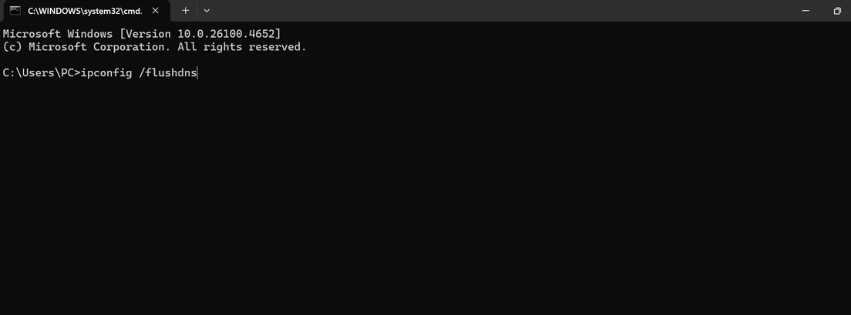
- Press Windows + R to open the Run dialog
- Type “cmd” and press Enter
- In the command prompt, type:
ipconfig /flushdns - Press Enter and wait for the confirmation message
- You’ll see “Successfully flushed the DNS Resolver Cache”
macOS Users (Worldwide)
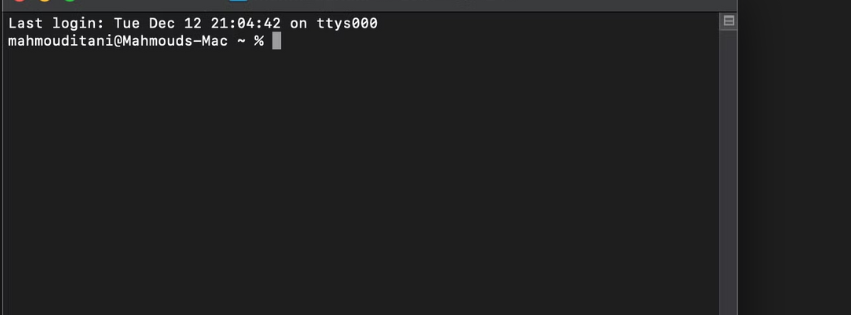
Complete Instructions:
- Open Terminal (found in Applications > Utilities)
- Type:
sudo dscacheutil -flushcache - Enter your admin password when prompted
- The process completes silently (no confirmation message)
- Close Terminal when finished
Linux Users (International)
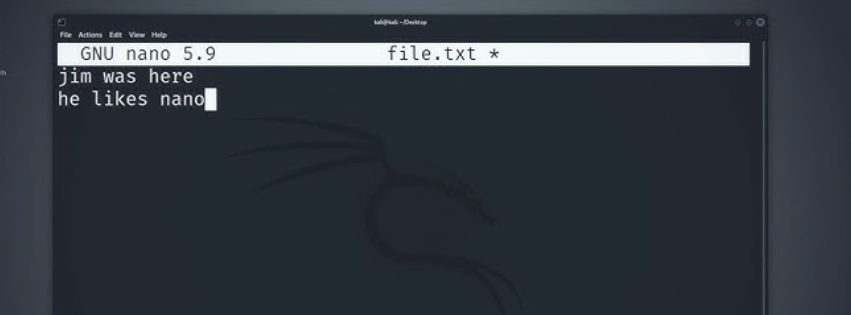
Multiple Options Available:
- Option 1:
sudo systemctl restart systemd-resolved - Option 2:
sudo service network-manager restart - Option 3:
sudo /etc/init.d/dns-clean restart
The beauty of these commands is their universality. A Windows computer in Tokyo responds to the same command as one in Toronto.
What Happens Immediately After Flushing?
Right after you flush your DNS cache, your computer essentially has amnesia about website addresses. This isn’t necessarily bad.
Post-Flush Timeline:
| Time After Flushing | What Happens | User Experience |
|---|---|---|
| 0-5 minutes | Computer rebuilds cache | Slightly slower page loads |
| 5-15 minutes | Most common sites cached | Normal browsing speed |
| 15-60 minutes | Full cache restoration | Optimized performance |
| 1+ hours | Complete optimization | Better than before |
What You’ll Notice:
- The first website you visit afterward might take an extra second or two to load
- Your computer needs to ask around again to find out where that website lives
- Popular websites return to normal speed quickly
- Less popular sites may take longer to optimize
Some users worry about increased internet traffic after flushing DNS. While it’s true that your computer will make more DNS queries initially, the impact is minimal. We’re talking about tiny data packets that contain just the website names you’re looking for.
Are There Any Risks to Consider?
Honestly? The risks are so minimal they’re hardly worth mentioning. But since you asked, let me be completely transparent about what could potentially go wrong.
Potential Risks and Their Reality:
| Perceived Risk | Reality | Severity |
|---|---|---|
| Computer damage | Impossible with DNS flushing | None |
| Data loss | DNS flushing doesn’t affect files | None |
| Slower internet | Temporary, 1-2 seconds max | Very Low |
| Increased data usage | Minimal DNS queries only | Very Low |
| System instability | DNS flushing is completely safe | None |
Actual Temporary Effects:
- Brief delays loading websites (first visit only)
- Slightly increased DNS query traffic
- Temporary loss of optimized routing paths
- Need to re-authenticate on some websites
- Minor inconvenience during busy work periods
The most significant risk is temporary inconvenience. If you’re in the middle of something important online, you might experience brief delays as your computer re-learns website addresses.
Some users report that certain websites load slower after flushing DNS. This typically happens when your computer was using a faster DNS server path before, and now it has to rediscover that optimal route. The good news? This usually resolves itself within a few hours as your cache rebuilds.
For those concerned about security, Cloudflare’s DNS documentation provides excellent insights into how DNS flushing can actually improve your security posture by clearing potentially compromised cache entries.
Advanced Considerations for Global Users
Different regions face unique DNS challenges. Users in some countries might rely on specific DNS servers that comply with local regulations. Flushing your cache doesn’t change these settings – it just clears the stored results.
If you’re using a VPN service, DNS flushing becomes even more important. VPNs often route your DNS queries through different servers, and old cached entries might conflict with your new virtual location.
Corporate networks present another interesting scenario. Many businesses use internal DNS servers that resolve company-specific addresses. Flushing DNS in these environments is not only safe but often necessary when network administrators make changes to internal systems.
When DNS Flushing Might Not Solve Your Problem
Let’s be realistic: DNS flushing isn’t a magic bullet. Sometimes the problem lies elsewhere, and clearing your cache won’t make a difference.
Problems DNS Flushing Cannot Fix:
| Issue Type | Examples | Better Solutions |
|---|---|---|
| Hardware problems | Broken network card, faulty cables | Hardware replacement |
| ISP outages | Widespread internet down | Wait for ISP restoration |
| Server problems | Website completely offline | Contact website owner |
| Router issues | WiFi not working | Restart router/modem |
| Browser problems | Specific browser won’t load sites | Clear browser cache |
Signs the Problem Isn’t DNS Related:
- No websites load at all
- Your WiFi shows “no internet connection”
- Other devices on your network also have problems
- The issue started after a power outage
- Only one specific browser is affected
If you’re dealing with widespread internet connectivity issues, the problem might be with your ISP or internet infrastructure. No amount of DNS flushing will fix a broken cable connection or server outage.
Hardware problems present another limitation. If your network adapter is malfunctioning or your router is having issues, DNS flushing won’t resolve these underlying problems. It’s like trying to fix a flat tire by cleaning your windshield: you’re addressing the wrong issue.
Best Practices for DNS Management Worldwide
Here’s something most people don’t consider, you don’t need to flush your DNS cache regularly. Your computer is pretty good at managing this information on its own. Think of DNS flushing as a troubleshooting tool, not a maintenance routine.
DNS Flushing Frequency Guidelines:
| User Type | Recommended Frequency | Reasoning |
|---|---|---|
| Regular users | Only when problems occur | Computer manages cache well |
| Web developers | Weekly or after major changes | Testing requires fresh lookups |
| Network admins | As needed for troubleshooting | Professional requirement |
| VPN users | Monthly or when switching servers | Prevents conflicting entries |
| Gamers | Only for connection issues | Unnecessary for gaming |
Some users get into the habit of flushing DNS weekly or daily, thinking it improves performance. In reality, this usually makes things slower because your computer constantly has to relearn website addresses. It’s like throwing away your phone book every day: counterproductive.
Situations That Warrant More Frequent DNS Flushing:
- If you’re a web developer testing websites on different servers
- When you frequently switch between different networks
- If you’re experiencing persistent connectivity issues
- After major network configuration changes
- When working with VPN services regularly
- During website migrations or server changes
For hosting professionals and businesses requiring reliable DNS services, TrueHost.cloud offers enterprise-grade DNS management with global redundancy, ensuring your websites remain accessible regardless of local DNS issues.
Alternative Solutions to Try First
Before you rush to flush your DNS, consider these simpler alternatives. Sometimes the problem isn’t with your DNS cache at all.
Try refreshing the webpage first. Press Ctrl+F5 (or Cmd+Shift+R on Mac) to force a complete page reload. This often resolves temporary loading issues without affecting your entire DNS cache.
Checking your internet connection sounds obvious, but it’s worth mentioning. Try accessing a different website to confirm whether the problem is specific to one site or affects your entire connection.
Browser cache clearing is another option. Sometimes your browser’s cache conflicts with DNS information, creating confusion. Clearing your browser cache is less drastic than flushing system-wide DNS and might solve your specific problem.
How DNS Propagation Works
Understanding DNS propagation helps explain why flushing sometimes seems necessary. When a website changes its server location, this information needs to spread across the internet’s DNS infrastructure.
ICANN’s documentation explains how DNS changes can take up to 48 hours to propagate globally. During this time, different DNS servers might have different information about the same website.
Your computer’s cache might contain outdated information during these propagation periods. Flushing your DNS cache ensures you get the most current address information, which is particularly important if you’re trying to access a website that recently moved servers.
Should You Flush Your DNS?
After all this discussion, the decision comes down to your specific situation. Are you experiencing connectivity issues that other troubleshooting steps haven’t resolved? DNS flushing is probably worth trying.
Is your internet working fine, and you’re just curious about optimization? You might want to skip it. Your computer’s DNS cache is likely helping your browsing experience more than hindering it.
For most users worldwide, DNS flushing is safe and occasionally useful. It’s a tool in your troubleshooting toolkit, not a daily maintenance task. When you need it, it’s there. When you don’t, your computer manages things quite well on its own.
Conclusion
So, is it safe to flush DNS? Absolutely. Whether you’re troubleshooting connectivity issues in Canada or optimizing your browsing experience in Cambodia, DNS flushing is a safe and effective technique.
The process won’t harm your computer, corrupt your data, or cause any permanent changes to your system. The worst-case scenario is a few minutes of slightly slower website loading while your computer rebuilds its cache.
Remember that DNS flushing is a troubleshooting tool, not a performance enhancer. Use it when you’re experiencing specific connectivity issues, not as a regular maintenance routine. Your computer is quite capable of managing its DNS cache without your constant intervention.
If you’re still experiencing persistent DNS issues after flushing, consider upgrading to a more reliable hosting solution. TrueHost Cloud provides robust DNS management services with global coverage, ensuring your online presence remains stable and accessible to users worldwide.
The next time someone asks you whether it’s safe to flush DNS, you can confidently say yes – and explain exactly why they shouldn’t worry about it. After all, knowledge is power, and now you have both.
Read Also: