 Domain SearchSecure your perfect UAE domain in seconds.
 Domain TransferSeamless domain transfer. Zero downtime, complete control.
 All TLDsSecure your ideal domain. Explore local UAE and international extensions.
 WHOIS LOOKUPCheck domain ownership, expiry dates, and registrar details instantly.
 AE DomainRegister a .AE domain and build trust in the UAE.
 SSL CertificatesProtect your site with trusted SSL Certificates to secure data and build customer confidence.
 .com DomainGet the world’s most trusted domain and build credibility from day one.
 Web hostingFind budget-friendly hosting that doesn’t compromise on performance.
 Windows HostingHigh-performance hosting for Windows applications and websites.
 Affiliate ProgramBecome a partner and earn commission for every referral.
 WordPress HostingBlazing-Fast WordPress Hosting, Optimised for Performance.
 Email HostingSecure your communications with professional email hosting. Use your domain, stay in control.
 Reseller HostingLaunch your own hosting brand. We handle the tech, you grow your business.
 cPanel HostingHosting supported by cPanel (simple and user-friendly)
 VPS HostingVirtual servers that grow with you. Full root access. Blazing fast performance.
 Managed VPS HostingNot a tech expert? Let us handle everything with our fully managed VPS hosting.
 Dedicated ServersEnjoy full access and total control over your dedicated physical server.
 AI Website BuilderBuild beautiful websites instantly with AI.
 Online ShopCreate a professional online store. No coding needed.
 Web Design ServicesGet a custom website built for your brand and your goals.
 BlogDiscover resources on web hosting, e-commerce, digital marketing, and beyond.
 Contact UsWe are available 24/7 via chat or email
 SupportExplore guides and answers for all our services

You registered your business in Dubai. You built a website and printed business cards. But your email still ends in @gmail.com.
That one detail is costing you clients before a single conversation begins.
Corporate buyers in the UAE read trust signals fast. A generic email address raises an immediate red flag. It makes people question whether your business is real.
Government tenders, corporate procurement teams, and regular retail clients all expect a branded email.
In regulated sectors such as healthcare or finance, using a third-party Gmail account may conflict with UAE data protection laws.
This guide walks you through every step. You will pick the right .ae registrar, configure your DNS records, and choose the best email provider for your team.
By the end, you will have a fully working business email on your own custom domain.
Step 1: Choose and Register Your Domain Name in the UAE
The .ae domain is the country code top-level domain (ccTLD) for the United Arab Emirates. It signals local presence in a way no .com can replicate.
Some UAE government tenders and B2B contracts actively prefer businesses with a .ae digital footprint.
Keep your domain short and easy to spell. Avoid numbers and hyphens. They confuse people and reduce the likelihood that clients will type your address correctly from memory.
Include relevant keywords where your brand allows it. An address like legalservicesuae.ae gives Google a clear geographic and industry signal. That directly helps your local search rankings in UAE-specific queries.
Step 2: Choose an Email Hosting Provider

Not all email providers are equal in the UAE context. Your choice affects cost, compliance, deliverability, and how smoothly your team works day to day.
If you already pay for web hosting, you may already have email included. Most cPanel hosting plans bundle email accounts at no extra per-user cost.
For a solopreneur or a team of one to three people, that is a practical starting point.
Truehost email hosting packages include 2FA protection, antivirus checks, and advanced anti-spam protection.
Each mailbox has up to 50 GB of storage on the workplace business email plan.
Step 3: Connect Your Domain to Your Email Provider
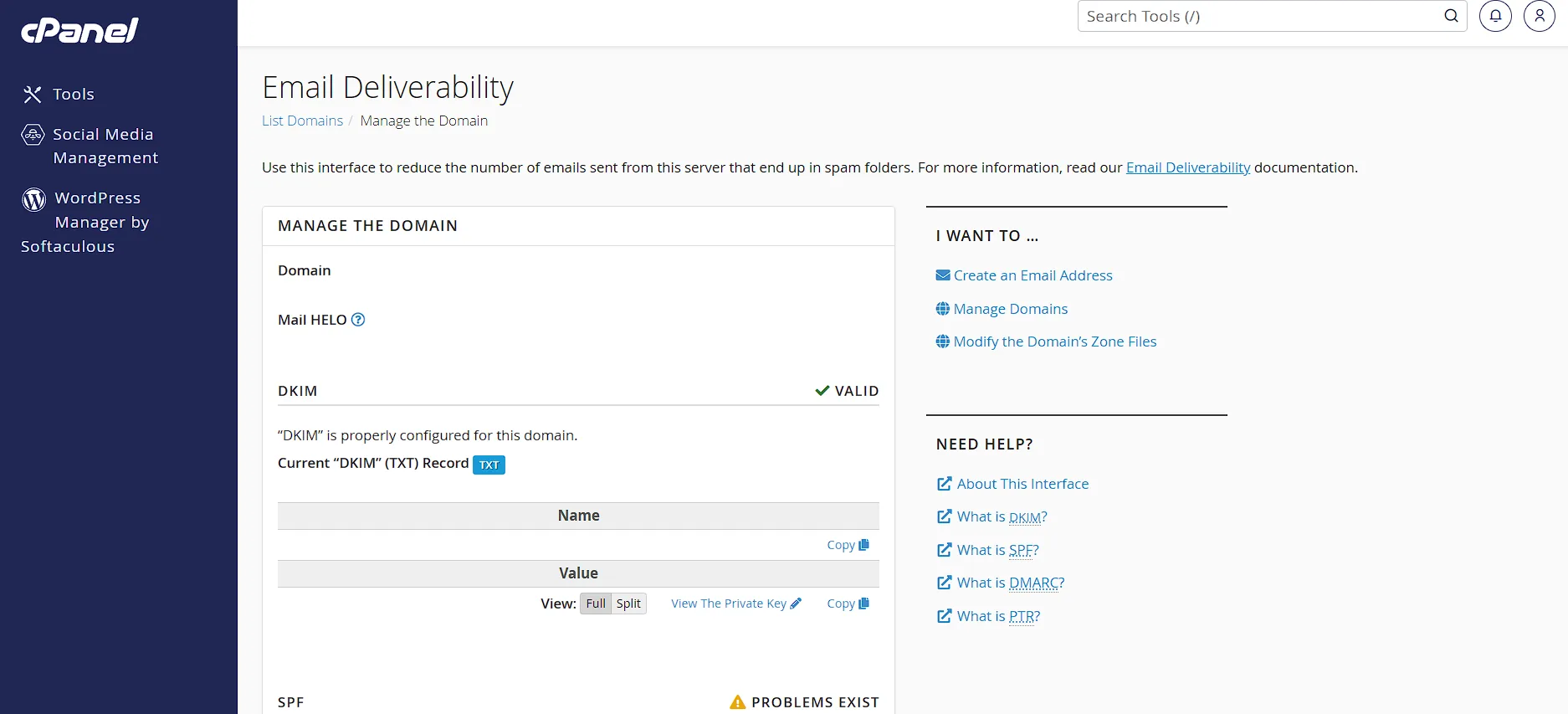
DNS records tell the internet where to send email for your domain. You need four record types to run a properly authenticated business email.
Skipping any of them hurts your deliverability and security. Here is what each record does:
- MX (Mail Exchange): Directs incoming email to your mail server. Without it, no one can send you an email at your domain.
- SPF (Sender Policy Framework): Lists IP addresses allowed to send email on your domain’s behalf. It stops other servers from impersonating your address.
- DKIM (DomainKeys Identified Mail): Adds a cryptographic signature to every outgoing message. Recipient servers use it to verify the email was not tampered with in transit.
- DMARC: Specifies how receiving servers should handle SPF or DKIM failures. Set it to quarantine or reject to protect your domain from spoofing.
How to Add DNS Records Through Your UAE Registrar
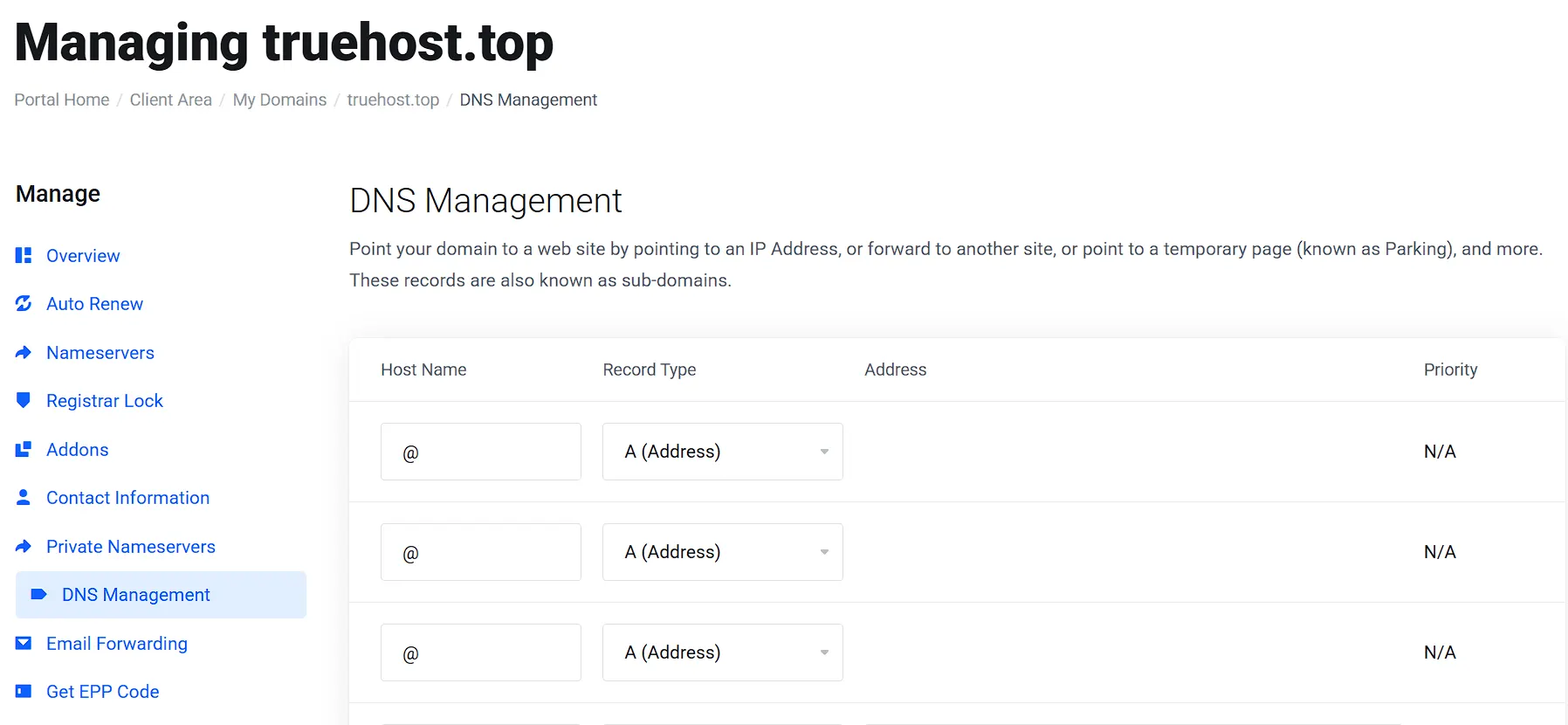
Log in to your registrar’s control panel. Look for a DNS Manager, DNS Zone Editor, or Domain Settings section. The exact label varies by provider, but the function is the same.
For each record, you will fill in three fields: Name (also called Host), Value (also called Points To or Content), and TTL (time to live). Set TTL to 3600 for most records. A lower TTL means changes propagate faster if you ever need to edit.
After saving your records, wait for DNS propagation. This takes anywhere from 15 minutes to 48 hours.
To check progress, visit MXToolbox at mxtoolbox.com and run the MX Lookup, SPF check, and DKIM check separately.
Step 4: Create and Configure Your Email Addresses
Start with a minimum viable set of addresses. For most UAE businesses, five addresses cover the core communication needs from day one.
| Address | Purpose |
| [email protected] | General inquiries and first contact from new clients |
| [email protected] | Commercial conversations and quote requests |
| [email protected] | Post-sale help and technical questions |
| [email protected] | Accounts payable and billing communications |
| [email protected] | Director or owner’s personal address |
In a bilingual setup, UAE businesses regularly communicate in both Arabic and English. Set your email display name to show both scripts where possible.
Setting Up Email on Mobile Devices in the UAE
Both Etisalat (e&) and du mobile networks in the UAE allow standard IMAP and SMTP traffic. No special network settings are needed to receive business email over mobile data.
For iPhone users, go to Settings, Mail, Accounts, then Add Account. Select Other and enter your IMAP details manually.
For Android users, open Gmail, tap Add Account, and select Other to enter your server settings manually.
Standard IMAP and SMTP settings for most UAE providers:
- Incoming server (IMAP): mail.yourprovider.com, Port 993, SSL enabled
- Outgoing server (SMTP): mail.yourprovider.com, Port 587, TLS enabled
Step 5: Test, Secure, and Maintain Your Business Email
Run three checks on MXToolbox before you send a single email from your new address.
First, run MX Lookup to confirm your mail records point to the right server.
Second, run SPF Record Check to verify your SPF syntax.
Third, run DKIM Lookup to confirm your public key is live.
After those pass, send a test email to a Gmail address and a Hotmail address. Both should land in the inbox, not the spam folder. If either ends up in spam, check your DMARC policy and SPF alignment.
Open the test email and view its full header. Look for three lines:
- SPF: PASS
- DKIM: PASS
- DMARC: PASS
All three passing together means your authentication is correctly configured and you are ready to go live.
Email Security Settings to Enable on Day One
Enable two-factor authentication during account setup. Do not save it for later.
Cybersecurity incidents targeting UAE SME email accounts are on the rise. A compromised admin email can expose your entire client database in minutes.
Set your DMARC policy to p=quarantine when you first go live. This tells receiving servers to send suspicious emails to the spam folder rather than rejecting them outright. After 30 days of clean reports, upgrade to p=reject.
Starting at p=reject immediately is a common mistake. It can block legitimate emails from your own domain while your configuration is still stabilizing. Give it a month of monitoring first, then tighten up.
Under PDPL Article 11, UAE businesses must notify affected parties of a data breach.
A configured email security stack speeds breach detection and makes the notification process much easier to manage.
Frequently Asked Questions
Do I need a UAE trade license to register a .ae domain?
Yes, businesses registering a .ae domain must provide a valid UAE trade license along with owner identification and business contact details. This confirms the registrant’s legitimacy and meets TDRA’s legal requirements.
Individuals can register a .ae domain without a trade license by providing their personal ID instead. Free zone companies and mainland companies both qualify for .ae registration under their respective trade licenses.
If you operate in the UAE without a full local trade license, a .com domain is still a valid option. You can pair it with a UAE-hosted email service for the same professional result.
What is the cheapest way to get a business email with a custom domain in the UAE?
The domain is your minimum unavoidable cost. A .ae domain runs AED 60-90 per year. A .com costs around USD 10-15 annually.
After the domain, your options break down by team size. For one to three users, cPanel hosting with bundled email is the most cost-effective option.
What is the difference between a .ae and a .com email for UAE business credibility?
The .ae domain is governed by TDRA. That gives UAE-based businesses a regulated digital identity that a .com cannot replicate. In government procurement and B2B contexts, .ae carries stronger local credibility.
For businesses targeting international clients, .com still has broader global name recognition. The smartest approach is to register both and use .ae as your primary address for UAE-facing communication.
Google treats .ae as a geographic signal. It can improve your rankings for UAE-specific search queries. That makes the .ae domain both a trust asset and a local SEO tool working together for your business.
Upgrade Your Business Email Today
Your email is live now, anchor it across every business touchpoint. Update your Google Business Profile with the new email address.
Change the contact email on your UAE trade license documentation. Update your website contact form, footer, and About page.
Get the best business email hosting in the UAE with Truehost today.