 Domain SearchSecure your perfect UAE domain in seconds.
 Domain TransferSeamless domain transfer. Zero downtime, complete control.
 All TLDsSecure your ideal domain. Explore local UAE and international extensions.
 WHOIS LOOKUPCheck domain ownership, expiry dates, and registrar details instantly.
 AE DomainRegister a .AE domain and build trust in the UAE.
 SSL CertificatesProtect your site with trusted SSL Certificates to secure data and build customer confidence.
 .com DomainGet the world’s most trusted domain and build credibility from day one.
 Web hostingFind budget-friendly hosting that doesn’t compromise on performance.
 Windows HostingHigh-performance hosting for Windows applications and websites.
 Affiliate ProgramBecome a partner and earn commission for every referral.
 WordPress HostingBlazing-Fast WordPress Hosting, Optimised for Performance.
 Email HostingSecure your communications with professional email hosting. Use your domain, stay in control.
 Reseller HostingLaunch your own hosting brand. We handle the tech, you grow your business.
 cPanel HostingHosting supported by cPanel (simple and user-friendly)
 VPS HostingVirtual servers that grow with you. Full root access. Blazing fast performance.
 Managed VPS HostingNot a tech expert? Let us handle everything with our fully managed VPS hosting.
 Dedicated ServersEnjoy full access and total control over your dedicated physical server.
 AI Website BuilderBuild beautiful websites instantly with AI.
 Online ShopCreate a professional online store. No coding needed.
 Web Design ServicesGet a custom website built for your brand and your goals.
 BlogDiscover resources on web hosting, e-commerce, digital marketing, and beyond.
 Contact UsWe are available 24/7 via chat or email
 SupportExplore guides and answers for all our services
Want to host your own game server without breaking the bank? You’re in the right place.
Setting up a game server on a VPS has become the go-to solution for UAE gamers who are tired of paying premium prices for managed hosting. Think about it – why rent someone else’s server when you can run your own for a fraction of the cost?
Here’s the thing: you don’t need to be a tech wizard to pull this off. Sure, there’s a learning curve, but nothing you can’t handle with a bit of patience and this guide.
Whether you’re planning to host Minecraft for your friends in Dubai or run a CS2 server for your Abu Dhabi gaming clan, we’ll walk through everything you need to know.
Why UAE Gamers Should Choose VPS for Game Server Hosting
Let’s talk money first because that’s what matters.
Managed game hosting services charge anywhere from AED 150 to AED 500 monthly for basic packages. A decent VPS? You’re looking at AED 80-200 for similar specs. Sometimes even better performance.
The math is simple. Over a year, you could save enough to upgrade your gaming rig.
But cost isn’t the only reason gamers across the Emirates are switching to VPS solutions.
Performance
Here’s something most gamers know too well: lag kills the experience.
When your game server sits in Europe or Asia, you’re dealing with 100-200ms ping times. That’s playable, sure, but it’s not great. Your shots don’t register quite right. Your building placements feel delayed. Small delays that add up to big frustrations.
A VPS in Dubai or Bahrain data centers? You’re talking 10-30ms for most UAE players. That’s the difference between good and butter-smooth gameplay.
You also get dedicated resources. No sharing CPU or RAM with a hundred other servers. Your Valheim world loads faster. Your Rust server handles more players without stuttering.
Full Control Changes Everything
Remember that mod you wanted to install but couldn’t because your hosting provider didn’t support it?
With your own VPS game server, those limitations vanish. Install any mod. Change any setting. Run multiple game servers on one machine if you want.
You decide when to update. You choose which plugins to use. You configure everything exactly how your community needs it.
Finding the Right VPS Provider for Your Game Server
Not all VPS providers work well for gaming.
Some oversell their servers. Others have data centers too far from the Middle East. A few skimp on CPU performance, which matters more for game servers than most people realize.
What Matters?
Location tops the list. You want servers in UAE, Bahrain, or Saudi Arabia. Anything further adds latency your players will notice.
CPU performance comes next. Game servers love single-thread speed. A server with fewer fast cores beats one with many slow cores every time.
RAM needs vary by game. Minecraft modded servers? You’ll need 6-8GB minimum. Vanilla survival? 2-4GB works fine. CS2 runs comfortably on 4GB.
Storage type matters less than you’d think. Any SSD works fine. NVMe is nice but not necessary for most game servers.
DDoS protection isn’t optional. Gaming servers attract attacks. Someone gets salty about getting banned and decides to knock your server offline. It happens more than you’d expect.
Budget Reality Check
Entry-level gaming on VPS starts around AED 60-100 monthly. That gets you 2-4GB RAM and enough power for small friend groups.
Mid-range setups run AED 150-300. These handle 20-40 players comfortably depending on the game.
High-performance servers for large communities? Budget AED 400+ monthly. You get the horsepower needed for heavily modded servers or multiple game instances.
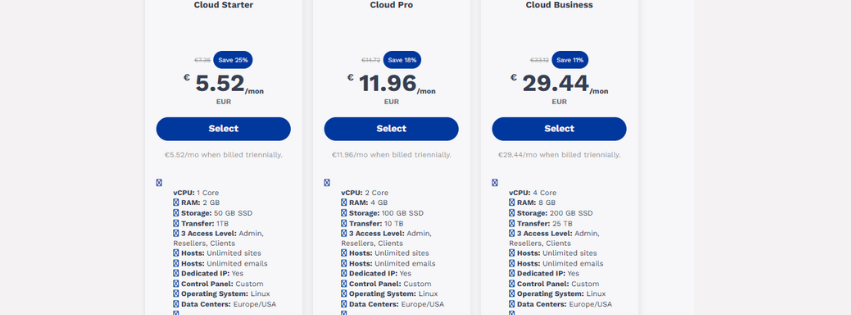
TrueHost Cloud offers VPS plans starting at competitive rates with data centers close to UAE. Their configurations work well for game hosting, and the support team actually understands gaming requirements.
Getting Your Setup Ready
You’ll need a few things before diving into server configuration.
First, basic command line knowledge helps. You don’t need to be a Linux expert, but understanding how to navigate directories and run commands makes life easier.
Tools You’ll Use
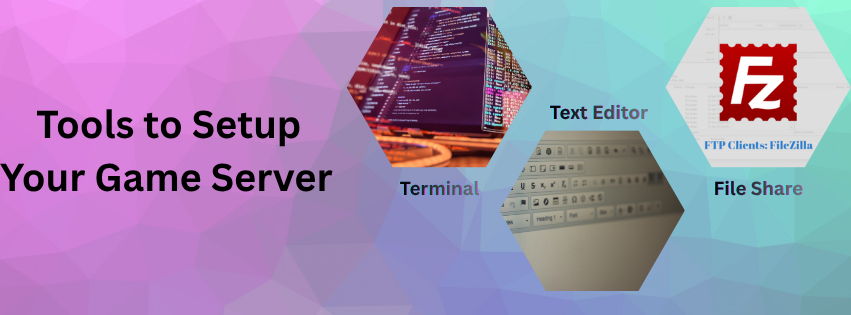
Download an SSH client. Windows users grab PuTTY. Mac and Linux folks already have Terminal built in.
Get FileZilla for transferring files. Sometimes you need to upload world saves or download logs. FTP makes that simple.
A decent text editor helps when editing configuration files. Notepad++ on Windows or Sublime Text work great. Avoid regular Notepad – it mangles formatting.
Account Bits and Pieces
Consider grabbing a domain name. It’s optional but makes your server address memorable. Playing on mc.yourguild.com beats remembering 185.234.12.45 every time.
Set up your VPS account. Most providers in the region accept credit cards and local bank transfers. Some even take payment through UAE exchange services.
Setting Up Your VPS Game Server Step by Step
Time to get your hands dirty.
First things first – access your VPS through SSH. Your provider sends login credentials after purchase. Use those to connect.
1) Initial Configuration
Run system updates immediately. Fresh VPS installations often have outdated packages.
sudo apt update && sudo apt upgrade -y
Create a non-root user for security. Running everything as root is asking for trouble.
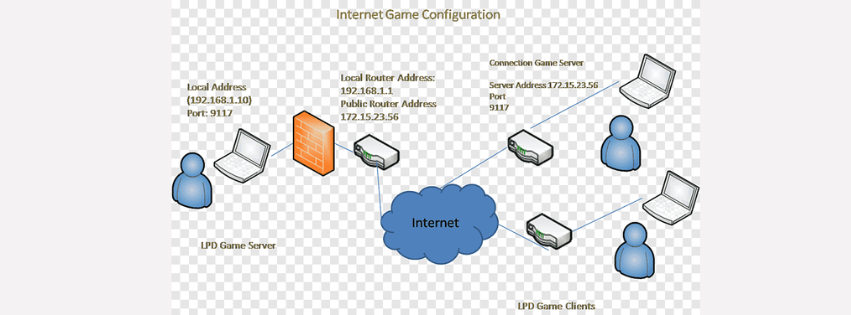
Set up firewall rules. Allow SSH on port 22. Allow your game’s ports. Block everything else initially.
Most game servers need specific ports open. Minecraft uses 25565. CS2 needs 27015. Valheim requires 2456-2458. Check your game’s documentation.
2) Installing What You Need
Java-based games like Minecraft need Java installed. Most modern Minecraft versions want Java 17 or newer.
Steam games require SteamCMD. This tool downloads and updates game server files automatically.
Some Windows-only servers need Wine. ARK comes to mind. Wine isn’t perfect but works for many games.
Screen or tmux keeps your server running when you disconnect from SSH. Can’t stress this enough – you want persistent sessions.
3) Grabbing Game Files
SteamCMD handles most popular multiplayer games. You feed it an app ID and it downloads everything.
Non-Steam games vary. Minecraft you download directly from Mojang. Some games provide Linux server builds on their websites.
File permissions trip up newcomers constantly. Make sure your server user can read and execute the files. 755 for directories, 644 for most files works.
4) Configuration Time
Every game server has configuration files. Usually called server.properties or something similar.
Edit these carefully. Set your server name. Choose a good password. Pick your preferred game mode and difficulty.
Memory allocation needs attention. Java games especially. Too little RAM and your server crashes. Too much and you waste resources.
java -Xms2G -Xmx4G -jar server.jar
That command allocates 2GB minimum, 4GB maximum for a Minecraft server.
5) Making It Accessible
Firewall rules need configuring properly. Use ufw on Ubuntu for simplicity.
sudo ufw allow 25565/tcp
sudo ufw enable
Game servers use TCP, UDP, or both. Check your specific game’s requirements. Getting this wrong means nobody can connect.
6) First Launch
Start your server for the first time. Watch the console output. Look for errors.
Many servers generate additional config files on first run. Let it complete, then shut down and configure those files.
Use screen to keep things running.
screen -S gameserver
./start-server.sh
Press Ctrl+A then D to detach. Your server keeps running while you disconnect.
Popular Game Server Configurations
Different games need different approaches.
I) Minecraft Never Gets Old
Minecraft remains huge in UAE gaming circles. Setting it up is straightforward.
Vanilla servers need 2GB RAM minimum for 10 players. Add 500MB per 5 additional players roughly.
Modded servers demand more. Modpacks like All The Mods 9 want 6-8GB. Some massive packs need 12GB+.
Paper or Spigot optimize performance compared to vanilla. They’re drop-in replacements that reduce lag significantly. Plugins expand functionality – grief protection, economy systems, minigames.
TrueHost Cloud’s VPS plans scale easily when your Minecraft community grows. Start small and upgrade as needed.
II) CS2 Server Hosting
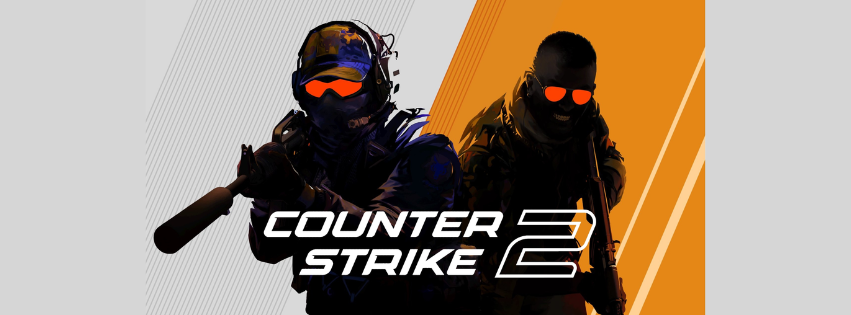
Counter-Strike 2 servers run through SteamCMD. Installation takes maybe 20 minutes.
Resource requirements are modest. 4GB RAM handles 32 players comfortably. CPU matters more – fast cores improve tick rate.
Workshop maps and custom content add replay value. Configuration is simpler than CS:GO was. Valve streamlined many server settings.
Default ports are 27015 for game traffic, 27020 for SourceTV. Open both if you want spectator features.
III) Valheim and Survival Games

Valheim dedicated servers need about 2GB RAM minimum. More if you have elaborate builds or many players.
World backups are critical. Valheim worlds can corrupt. Schedule automated backups or regret it later.
The game uses ports 2456-2458 UDP. Forward all three for proper connectivity.
Performance optimization involves tweaking instance count and backup frequency. Too many instances hurt performance. Too many backups fill your disk.
Quick Comparison
| Game | Min RAM | CPU Cores | Default Port | Difficulty |
|---|---|---|---|---|
| Minecraft Vanilla | 2GB | 2 | 25565 | Easy |
| Minecraft Modded | 6GB | 4 | 25565 | Medium |
| CS2 | 4GB | 4 | 27015 | Easy |
| Valheim | 2GB | 2 | 2456-2458 | Easy |
| Rust | 8GB | 4 | 28015 | Hard |
| ARK | 8GB | 4 | 7777 | Medium |
Rust and ARK demand more resources. They’re heavier games with larger maps and more systems running simultaneously.
Optimizing Performance for UAE Players
Raw specs only tell part of the story.
Configuration tweaks make huge differences in gameplay quality.
A) Network Tuning
Tick rate affects how often the server updates game state. Higher tick rates feel smoother but use more CPU.
Most games default to reasonable values. CS2 runs 64 tick on community servers. Minecraft defaults work fine for most scenarios.
Bandwidth usually isn’t your bottleneck unless you have dozens of players. Even then, 100Mbps handles most game servers easily.
B) Resource Management
Allocate CPU cores to your game server process. Linux scheduler handles this, but you can set affinity manually for consistent performance.
RAM allocation needs balancing. Allocate enough to prevent garbage collection spikes. Don’t allocate so much you page to swap.
Swap space should exist but rarely get used. If you’re swapping regularly, you need more RAM.
C) Lag Reduction Tactics
Server location matters most. Nothing beats hosting near your players.
Player count limits prevent overload. Know your server’s capacity. A laggy 40-player server is worse than a smooth 25-player one.
Background processes steal resources. Disable unneeded services. Gaming VPS should run lean.
You can learn more about server optimization techniques from experienced hosting communities.
D) Maintenance Keeps Things Smooth
Automated backups save heartache. Script them to run daily or twice daily for active servers.
Log files grow endlessly if ignored. Rotate them weekly. Delete old logs monthly.
Updates need scheduling. Don’t update during peak hours. Have rollback plans if updates break things.
Securing Your Game Server
Security isn’t optional when running public servers.
Attackers scan for vulnerable game servers constantly. Compromised servers join botnets or get used for crypto mining.
Basic Protection
Strong passwords everywhere. Server admin passwords. SSH passwords. FTP passwords. Use password managers to generate random strings.
SSH key authentication beats passwords. Generate keys, disable password login. Attackers can’t brute force what doesn’t exist.
Fail2ban watches for repeated failed logins. After several attempts, it blocks the IP automatically. Simple but effective against automated attacks.
Regular updates patch vulnerabilities. Ubuntu releases security patches frequently. Apply them promptly.
DDoS Considerations
DDoS attacks will happen eventually. Angry players exist in every gaming community.
Provider-level protection helps. Many VPS hosts include basic DDoS filtering. It’s not perfect but blocks simple attacks.
Cloudflare can proxy certain game server types. It works better for web-based control panels than game traffic itself.
Rate limiting in your game server config prevents some attack vectors. Set reasonable connection attempt limits.
Backup Strategy
Automated scripts beat manual backups. You’ll forget manual backups at the worst possible time.
Off-site storage is crucial. Keep backups somewhere other than your game server. Cloud storage works. A home PC backup works too.
Recovery testing matters. Backup files you can’t restore are worthless. Test your backup restoration process occasionally.
TrueHost Cloud provides snapshot functionality that makes server backups quick and reliable.
Connecting Your Players
You’ve got a working server. Now people need to find it.
Server Addressing
IP addresses work but nobody remembers them. Domain names stick in memory better.
DNS configuration is simple. Point an A record at your VPS IP. Use a subdomain like game.yourdomain.com or mc.yourdomain.com.
SRV records help some games. Minecraft especially. They let you use default ports while hosting on custom ones.
Building Your Community
Discord integration brings players together outside the game. Create a server. Share the game server address there.
Server rules prevent chaos. Post them clearly. Enforce them consistently. Nothing kills a gaming community faster than favoritism or ignored griefers.
Whitelisting keeps things tight-knit. Friends-only servers benefit from whitelist systems. Public servers might want application systems instead.
Most gaming communities share best practices for server moderation that apply across different games.
Ready to Host Your Own Game Server?
Setting up a game server on a VPS isn’t as scary as it seems.
You’ve seen the process. Initial configuration takes time. Ongoing maintenance is manageable. Cost savings are real.
UAE gamers benefit tremendously from local VPS hosting. Lower ping improves gameplay. Full control enables customization. Community building becomes easier.
Start small if you’re nervous. Host a Minecraft server for five friends. Learn the ropes. Scale up when comfortable.
The gaming community across Dubai, Abu Dhabi, and the broader Emirates continues growing. Local servers strengthen these communities. You could be running the next popular regional server.
Your friends are waiting to play on lag-free servers. Your clan needs a home. The tools and knowledge are here. Time to make it happen.
Stop renting overpriced managed hosting. Take control. Build something your gaming community will love.