 Domain SearchSecure your perfect UAE domain in seconds.
 Domain TransferSeamless domain transfer. Zero downtime, complete control.
 All TLDsSecure your ideal domain. Explore local UAE and international extensions.
 WHOIS LOOKUPCheck domain ownership, expiry dates, and registrar details instantly.
 AE DomainRegister a .AE domain and build trust in the UAE.
 SSL CertificatesProtect your site with trusted SSL Certificates to secure data and build customer confidence.
 .com DomainGet the world’s most trusted domain and build credibility from day one.
 Web hostingFind budget-friendly hosting that doesn’t compromise on performance.
 Windows HostingHigh-performance hosting for Windows applications and websites.
 Affiliate ProgramBecome a partner and earn commission for every referral.
 WordPress HostingBlazing-Fast WordPress Hosting, Optimised for Performance.
 Email HostingSecure your communications with professional email hosting. Use your domain, stay in control.
 Reseller HostingLaunch your own hosting brand. We handle the tech, you grow your business.
 cPanel HostingHosting supported by cPanel (simple and user-friendly)
 VPS HostingVirtual servers that grow with you. Full root access. Blazing fast performance.
 Managed VPS HostingNot a tech expert? Let us handle everything with our fully managed VPS hosting.
 Dedicated ServersEnjoy full access and total control over your dedicated physical server.
 AI Website BuilderBuild beautiful websites instantly with AI.
 Online ShopCreate a professional online store. No coding needed.
 Web Design ServicesGet a custom website built for your brand and your goals.
 BlogDiscover resources on web hosting, e-commerce, digital marketing, and beyond.
 Contact UsWe are available 24/7 via chat or email
 SupportExplore guides and answers for all our services
Installing an ai chatbot for customer service has become a necessity for global businesses. Your website visitors expect instant responses.
Frankly, they won’t wait around for you to answer emails. Ready to transform your customer support?
TrueHost managed hosting solutions provide the perfect foundation for seamless chatbot integration worldwide.
Picture this: it’s 3 AM in Tokyo. Someone needs help with your product.
Without an ai chatbot for customer service, that potential customer just became a missed opportunity. But here’s the thing, adding a chatbot isn’t rocket science anymore.
You know what’s changed the game? The sheer accessibility of chatbot technology.
Gone are the days when you needed a computer science degree. You can now add intelligent customer support to your site easily.

What Exactly is a Website Chatbot?
An ai chatbot for customer service is basically your digital employee that never sleeps. It handles customer inquiries and qualifies leads.
It provides instant support across global time zones. Think of it as having a really efficient receptionist.
This receptionist speaks multiple languages and never takes coffee breaks.
Types of Chatbots You Can Install
Rule-based chatbots follow predetermined conversation paths. They’re like following a recipe – step by step.
No improvisation allowed. AI-powered chatbots learn from interactions.
These smart cookies use machine learning. They understand context and provide natural responses.
Hybrid chatbots combine both approaches. They start with rules but escalate to AI when things get complex.
Why Your Global Business Needs a Chatbot
Here’s the reality: customers from different continents have different expectations. An ai chatbot for customer service bridges those gaps perfectly.
Consider these benefits:
-
24/7 availability across all time zones
-
Instant responses (no more “we’ll get back to you”)
-
Multilingual support for global audiences
-
Cost reduction (one chatbot vs. multiple support agents)
-
Lead qualification while you sleep
The numbers don’t lie. According to Salesforce research, 69% of consumers prefer chatbots for quick communication with brands.
Popular Chatbot Platforms for Global Websites
Choosing the right platform feels overwhelming, doesn’t it? Let me break down your options without the marketing fluff.
Free Solutions That Actually Work
Tidio offers a generous free tier. Perfect for small businesses testing the waters.
You can experiment with ai chatbot for customer service features easily. Chatfuel excels at Facebook Messenger integration.
Great if your audience hangs out on social media. ManyChat provides basic automation features.
Simple setup with decent customization options. Here’s a quick comparison:
| Platform | Free Messages | Global Support | AI Features |
|---|---|---|---|
| Tidio | 100/month | Yes | Limited |
| Chatfuel | 1,000/month | Yes | Basic |
| ManyChat | 1,000/month | Yes | Templates |
Premium Platforms Worth the Investment
Intercom dominates the enterprise space. Their ai chatbot for customer service handles complex queries beautifully.
Zendesk Chat integrates seamlessly with existing support systems. Perfect for businesses already using Zendesk tools.
Drift focuses on sales and lead generation. Their conversational marketing approach converts visitors into customers effectively.
HubSpot combines CRM with chatbot functionality. One platform, multiple solutions for growing businesses.
AI-Powered Solutions for Advanced Users
ChatGPT integration through APIs provides human-like conversations. Your ai chatbot for customer service becomes incredibly sophisticated.
Dialogflow (now Google Cloud Contact Center AI) offers natural language processing. Complex but powerful for enterprise needs.
Microsoft Bot Framework provides enterprise-grade solutions. Technical setup required but worth the effort.
Step-by-Step Installation Guide for Global Websites
Ready to get your hands dirty? Let’s install your first ai chatbot for customer service.
Method 1: Widget Installation
This approach works for 90% of websites worldwide. No coding experience needed.
1: Sign up for your chosen platform.
2: Customize your chatbot’s appearance and behavior.
3: Copy the provided embed code.
4: Paste it before the closing </body> tag.
5: Test functionality across different devices. Most platforms provide installation wizards.
Follow their prompts – they’re designed for non-technical users.
Method 2: WordPress Plugin Route
WordPress powers 40% of global websites. Makes sense to have a dedicated approach.
Popular plugins include:
-
WP Chatbot for Messenger
-
Tidio Live Chat
-
LiveChat
-
Chatbot with ChatGPT
Installation process:
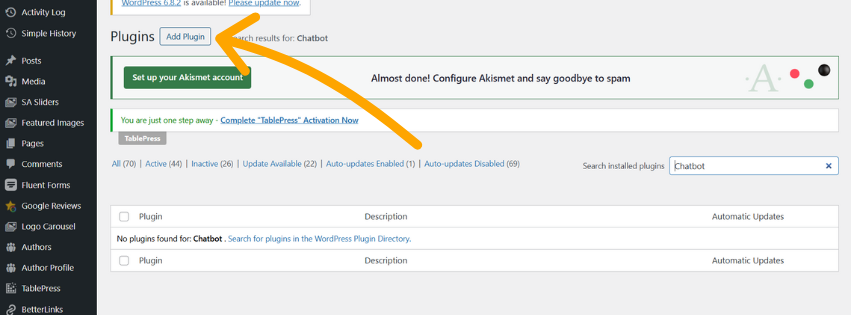
- Navigate to Plugins > Add New
- Search for your preferred chatbot plugin
- Install and activate
- Configure settings through the dashboard
- Customize appearance to match your brand
Method 3: Custom Integration for Advanced Users
This method gives you complete control. Your ai chatbot for customer service functionality becomes fully customizable.
You’ll need basic HTML/JavaScript knowledge. Most platforms provide detailed API documentation.
Want seamless performance? TrueHost optimized servers ensure your chatbot loads lightning-fast globally.
Platform-Specific Installation for Global Reach
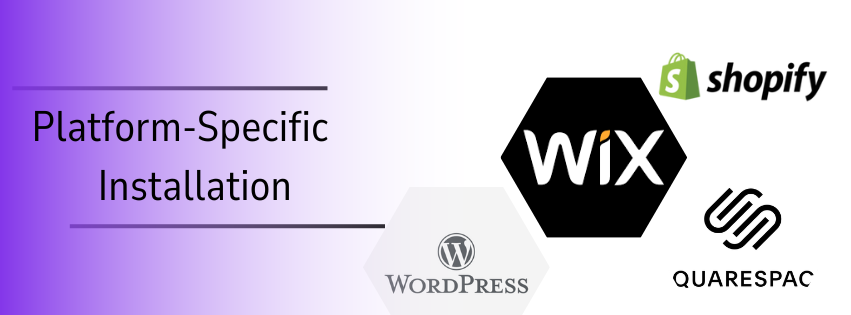
Different website builders require slightly different approaches. Here’s what works where.
WordPress Websites Worldwide
WordPress dominates globally for good reason. Installing an ai chatbot for customer service is straightforward.
Plugin method: Search “chatbot” in the plugin directory. Install, activate, configure.
Manual method: Add embed code to your theme files. Usually goes in footer.php or through a custom HTML widget.
Theme compatibility matters. Some themes conflict with chat widgets. Test thoroughly before going live.
Shopify Stores (E-commerce Focus)
Shopify’s app store makes installation simple. Search for chatbot apps, install, and configure.
Popular choices:
- Tidio
- Gorgias
- Reamaze
- Kit (formerly ConversioBot)
E-commerce specific features include order tracking. Product recommendations and abandoned cart recovery work automatically.
Wix and Squarespace Solutions
Both platforms offer built-in chat features. However, third-party solutions often provide better functionality.
Your ai chatbot for customer service capabilities improve significantly with dedicated platforms. Wix: Use the Wix App Market for chatbot installations.
Squarespace: Add code blocks or use third-party integrations.
Custom HTML Websites
Direct code embedding gives you maximum flexibility. Paste the chatbot code before the closing </body> tag.
Test across browsers – Chrome, Firefox, Safari, Edge. Global audiences use different browsers.
Advanced Configuration for Global Success
Basic installation is just the beginning. Real success comes from smart configuration.
Design Customization That Converts
Your ai chatbot for customer service should match your brand. Consistency builds trust worldwide.
Color scheme: Use your brand colors. Positioning: Bottom-right corner performs best globally.
Mobile responsiveness: 60% of global web traffic comes from mobile devices.
Conversation Flow Strategy
Great chatbots guide conversations naturally. Plan your flows like a helpful human would respond.
Welcome messages should be warm but brief. “Hi! How can I help you today?” works universally.
Automated responses handle common questions. FAQ automation reduces support tickets by 40%.
Human handoff for complex issues. Your ai chatbot for customer service should know its limits.
Integration with Global Business Tools
Connect your chatbot to existing systems for maximum efficiency.
CRM integration captures lead information automatically. Email marketing adds chat users to nurture sequences.
Analytics tracking measures performance and ROI. According to IBM research, businesses save $1.3 billion annually through chatbot implementations.
Testing Your Global Chatbot Performance
Installation without testing is like buying a car without checking if it starts.
Pre-Launch Testing Checklist
- Functionality testing: Does every conversation path work?
- Cross-browser compatibility: Test Chrome, Firefox, Safari, Edge.
- Mobile testing: Use actual devices, not just browser dev tools. Load speed: Chatbots shouldn’t slow down your site.
- Performance monitoring helps identify issues before customers complain.
Analytics and Optimization
Track these metrics for global success:
- Response accuracy rates
- Customer satisfaction scores
- Conversation completion rates
- Geographic performance variations
Google Analytics 4 can track chatbot interactions as events.
Troubleshooting Common Global Installation Issues
Every installation hits snags. Here’s how to solve the most common problems.
Code Conflicts and Solutions
JavaScript errors often cause chatbot failures. Check browser console for error messages.
Plugin conflicts happen with WordPress sites. Deactivate plugins one by one to identify culprits.
Cache issues prevent updates from appearing. Clear browser and server caches after changes.
Mobile Display Problems
Responsive design issues affect user experience. Test on actual devices across different screen sizes.
Touch target sizing matters for mobile users. Ensure chat buttons are finger-friendly.
Performance Impact Management
Loading speed concerns are valid. Choose lightweight chatbot solutions for optimal performance.
Server resources matter for high-traffic sites. Monitor CPU and memory usage after installation.
Global Best Practices for Chatbot Success
Success isn’t just about installation. It’s about creating meaningful customer experiences worldwide.
Clear conversation flows prevent user frustration. Map out common customer journeys before configuration.
Human handoff options maintain service quality. Your ai chatbot for customer service should seamlessly transfer complex issues.
Regular updates keep responses relevant. Review and update chatbot knowledge monthly.
Privacy compliance matters globally. Ensure GDPR, CCPA, and local privacy law compliance.
Multilingual support expands your reach. Consider language options for your target markets.
Start Your Global Chatbot Journey Today
Installing an ai chatbot for customer service transforms how you interact with global customers. The technology is accessible and the benefits are clear.
The time is now. Start with a simple platform like Tidio or Chatfuel.
Test basic functionality before investing in premium solutions. Ready to enhance your global customer experience?
TrueHost reliable hosting ensures your chatbot performs flawlessly across all continents.
Remember: the best chatbot is the one your customers actually use. Focus on user experience over fancy features.
You’ll build lasting customer relationships worldwide. Your global audience is waiting for instant support.
Give them what they deserve with a properly installed ai chatbot for customer service.