 Domain SearchSecure your perfect UAE domain in seconds.
 Domain TransferSeamless domain transfer. Zero downtime, complete control.
 All TLDsSecure your ideal domain. Explore local UAE and international extensions.
 WHOIS LOOKUPCheck domain ownership, expiry dates, and registrar details instantly.
 AE DomainRegister a .AE domain and build trust in the UAE.
 SSL CertificatesProtect your site with trusted SSL Certificates to secure data and build customer confidence.
 .com DomainGet the world’s most trusted domain and build credibility from day one.
 Web hostingFind budget-friendly hosting that doesn’t compromise on performance.
 Windows HostingHigh-performance hosting for Windows applications and websites.
 Affiliate ProgramBecome a partner and earn commission for every referral.
 WordPress HostingBlazing-Fast WordPress Hosting, Optimised for Performance.
 Email HostingSecure your communications with professional email hosting. Use your domain, stay in control.
 Reseller HostingLaunch your own hosting brand. We handle the tech, you grow your business.
 cPanel HostingHosting supported by cPanel (simple and user-friendly)
 VPS HostingVirtual servers that grow with you. Full root access. Blazing fast performance.
 Managed VPS HostingNot a tech expert? Let us handle everything with our fully managed VPS hosting.
 Dedicated ServersEnjoy full access and total control over your dedicated physical server.
 AI Website BuilderBuild beautiful websites instantly with AI.
 Online ShopCreate a professional online store. No coding needed.
 Web Design ServicesGet a custom website built for your brand and your goals.
 BlogDiscover resources on web hosting, e-commerce, digital marketing, and beyond.
 Contact UsWe are available 24/7 via chat or email
 SupportExplore guides and answers for all our services
Picture this: It’s 2 AM in Dubai, and your e-commerce platform just crashed. Your customers are trying to place orders, but the server won’t respond. You’re 30 kilometers away from your data center in a traffic jam on Sheikh Zayed Road. What do you do?
This is where IPMI becomes your lifeline.
Ahmed, an IT manager at a logistics company in Abu Dhabi, faced exactly this situation. His dedicated server went down during peak hours. Instead of rushing to the data center, he pulled out his laptop, logged into his IPMI interface, and had the server back online in less than five minutes.
That’s the power of remote server management.
What Is IPMI?
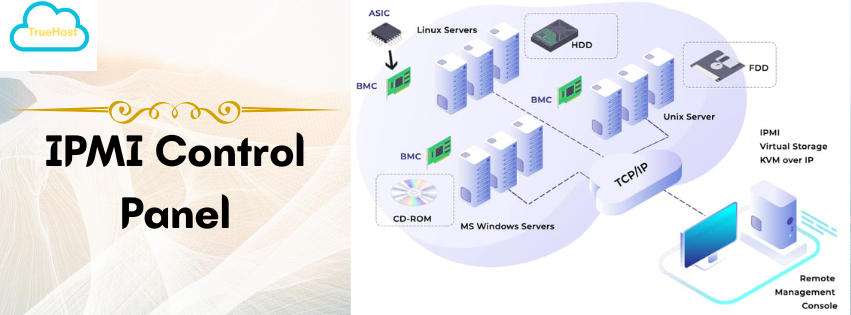
IPMI stands for Intelligent Platform Management Interface. Think of it as a secret back door to your server that works even when your operating system is completely dead.
Here’s the thing: IPMI operates independently from your main server software. It’s like having a spare key to your house that works even when the main lock is broken.
The technology runs on a special chip called a Baseboard Management Controller, or BMC for short. This little component sits directly on your server’s motherboard. It has its own network connection, its own processor, and its own memory.
Pretty clever, right?
Intel, HP, Dell, and NEC developed IPMI back in 1998. The current version, IPMI 2.0, came out in 2004 and it’s still going strong today. For businesses across Dubai, Sharjah, and Abu Dhabi managing multiple servers, this technology has become absolutely necessary.
How Does IPMI Work?
Let me break this down in simple terms.
Your server has two types of management: in-band and out-of-band. In-band management means you need the operating system running to control anything. Out-of-band management works at the hardware level, completely separate from your OS.
IPMI is out-of-band management.
The BMC chip connects to your network independently. It monitors your server’s hardware constantly, checking temperatures, fan speeds, power supplies, and memory status. When something goes wrong, you get alerts immediately.
You can access IPMI through a web browser, command-line tools, or specialized management software. Most UAE hosting providers give you a simple web interface that looks like a regular admin panel.
No special software needed on your end.
Key Features That Make IPMI Indispensable
1) Remote Power Control
You can turn your server on, off, or restart it from anywhere. Your laptop at home. Your phone at a café in Dubai Marina. Even from another country entirely.
Last month, my colleague Sarah managed her company’s server maintenance from a beach in the Maldives. Her team in Dubai needed a server restart during their network upgrade. She logged into IPMI, performed the restart, and went back to her vacation.
That’s the flexibility we’re talking about.
2) Remote Console Access
This feature deserves special attention. IPMI gives you KVM over IP, which means keyboard, video, and mouse access through your network connection.
You see exactly what you’d see if you were standing in front of the server. The BIOS screen. Boot messages. Everything.
I once helped a startup in DIFC troubleshoot a boot failure. Their Linux server wouldn’t start after a kernel update. Through IPMI, I accessed the GRUB bootloader, selected an older kernel version, and had them running again within minutes.
No data center visit required.
3) Hardware Monitoring
The UAE climate can be tough on server hardware. Temperatures outside reach 50 degrees Celsius in summer. Your data center’s cooling systems work overtime to maintain proper conditions.
IPMI monitors all critical components in real-time:
- CPU temperature readings
- Fan speeds and status
- Power supply voltage levels
- Memory module health
- Hard drive temperatures
You get alerts before components fail. That’s predictive maintenance at its finest.
One hosting company in Dubai prevented three major outages last year by catching failing fans through IPMI alerts. They replaced components during scheduled maintenance windows instead of dealing with emergency failures.
4) System Event Logs
Every hardware event gets recorded. Power cycles. Temperature spikes. Fan failures. Memory errors.
These logs help you troubleshoot issues that happened when nobody was watching. For UAE businesses dealing with compliance requirements, these detailed records prove invaluable during audits.
Why UAE Businesses Can’t Ignore IPMI
A) Cutting Downtime When Minutes Cost Money
Every minute your server stays down costs money. For e-commerce sites during Ramadan sales or Dubai Shopping Festival, downtime can mean hundreds of thousands of dirhams in lost revenue.
IPMI lets you respond instantly. No traffic. No physical access needed. Just immediate action.
At TrueHost Cloud, we’ve seen clients reduce their average incident response time from 45 minutes to under 5 minutes after implementing IPMI-enabled servers.
That’s a game changer for customer satisfaction.
B) Managing Multiple Locations Across the UAE
You might have servers in Dubai Internet City, another set in Abu Dhabi’s Masdar City, and backup systems in a Sharjah facility. Managing all these locations physically is impractical.
IPMI centralizes your control. One interface. Multiple servers. Any location.
A retail chain client of ours manages 15 dedicated servers across five emirates. Their IT team of three people handles everything remotely. Before IPMI, they needed twice as many staff members just for physical server management.
C) Cost Savings Add Up Fast
Let’s talk numbers for a moment.
Emergency data center visits cost between 500 to 1,500 AED per trip, depending on the provider and time of day. Multiply that by dozens of visits per year, and you’re looking at serious expenses.
IPMI eliminates most of these costs. You handle 90% of server issues remotely. The ROI typically shows within the first quarter.
D) Supporting UAE’s Digital Future
The UAE government’s digital transformation initiatives push businesses toward smarter infrastructure management. Remote capabilities align perfectly with the nation’s vision for efficient, technology-driven operations.
You’re not just adopting a tool. You’re positioning your business for the future.
Security Considerations You Must Address
Here’s where things get serious. IPMI gives you powerful access to your server hardware. That same power becomes a liability if not secured properly.
I) Change Those Default Credentials Immediately
Most servers ship with default IPMI usernames and passwords. Admin/admin. Root/calvin. These are publicly known.
Change them the moment you get server access. Use strong, unique passwords that you store in a password manager.
A security research study found thousands of IPMI interfaces exposed online with default credentials. Don’t become a statistic.
II) Network Isolation Protects Your Assets
Never expose your IPMI interface directly to the internet. Set up a dedicated management VLAN. Configure firewall rules that allow IPMI access only from specific IP addresses.
Use VPN connections for remote access. This adds a security layer that stops unauthorized access attempts before they even reach your IPMI interface.
UAE cybersecurity regulations require businesses to protect management interfaces. Proper IPMI security helps you stay compliant.
III) Keep Firmware Updated
IPMI firmware receives regular security patches. Manufacturers discover vulnerabilities and release updates to fix them.
Check for updates quarterly. Apply them during maintenance windows. Yes, it requires planning, but it’s better than dealing with a security breach.
Getting Started With IPMI on Your UAE Server
Initial Setup Takes Minutes
Most hosting providers in Dubai and Abu Dhabi configure basic IPMI settings before delivering your server. You’ll receive an IP address, username, and temporary password.
Log in through your web browser. The interface looks similar to a router admin panel. Navigate to the network settings first.
Configure a static IP address if you haven’t already. Set up email alerts for hardware issues. Create additional user accounts for your team members with appropriate permission levels.
Common Operations You’ll Use Daily
The IPMI web interface typically includes these sections:
System Information
- Hardware specifications
- Current power status
- Firmware versions
Remote Control
- Power on/off/restart buttons
- Remote console launcher
- Virtual media options
Sensor Readings
- Temperature graphs
- Fan speed indicators
- Voltage levels
Event Logs
- System event history
- Alert configuration
- Log downloads
For OS installations or repairs, you can mount ISO files as virtual media. The server thinks you’ve inserted a physical CD or USB drive. Pretty handy for remote installations.
Choosing the Right UAE Hosting Provider
Not all hosting packages include IPMI access. Some providers charge extra for it. Others include it standard with dedicated servers.
Ask these questions before signing up:
- Is IPMI included or an additional cost?
- Can I access the full IPMI interface or just basic functions?
- What’s the response time for IPMI-related support?
- Do you handle firmware updates or is that my responsibility?
TrueHost Cloud includes full IPMI access with all dedicated server plans across our UAE data centers. No hidden fees. No restricted features.
Look for providers with data centers in Dubai or Abu Dhabi. Local infrastructure means lower latency and better performance for your IPMI connections.
IPMI vs Other Management Tools
You might wonder how IPMI compares to alternatives. Let me give you a quick breakdown.
| Feature | IPMI | HP iLO | Dell iDRAC | Remote Desktop |
|---|---|---|---|---|
| Hardware Independence | Yes | Yes | Yes | No |
| Works When OS Down | Yes | Yes | Yes | No |
| BIOS Access | Yes | Yes | Yes | No |
| Industry Standard | Yes | No | No | Yes |
| Cost | Usually Free | Varies | Varies | Software Only |
HP’s iLO and Dell’s iDRAC offer similar functionality to IPMI. They’re proprietary versions built into their respective server brands. Both provide excellent management capabilities but tie you to specific hardware vendors.
IPMI works across multiple manufacturers. That’s flexibility you might appreciate later.
Remote Desktop or SSH connections require your operating system to be running. They’re great for software management but useless when your server won’t boot.
Your Next Steps
IPMI transforms how you manage dedicated servers in the UAE. The independence it provides goes beyond simple convenience.
You gain control. Reduce costs. Improve response times. Meet compliance requirements.
Whether you’re running a small business website or managing enterprise infrastructure across the Emirates, IPMI belongs in your technology stack.
Ready to experience true server management freedom? TrueHost Cloud offers IPMI-enabled dedicated servers optimized for UAE businesses. Our Dubai and Abu Dhabi data centers provide the infrastructure you need with the support you deserve.
Contact our team today for a consultation on your server requirements. We’ll help you choose the right configuration and show you how IPMI can simplify your operations.
Your 2 AM emergency doesn’t have to mean a mad dash to the data center anymore.