 Domain SearchSecure your perfect UAE domain in seconds.
 Domain TransferSeamless domain transfer. Zero downtime, complete control.
 All TLDsSecure your ideal domain. Explore local UAE and international extensions.
 WHOIS LOOKUPCheck domain ownership, expiry dates, and registrar details instantly.
 AE DomainRegister a .AE domain and build trust in the UAE.
 SSL CertificatesProtect your site with trusted SSL Certificates to secure data and build customer confidence.
 .com DomainGet the world’s most trusted domain and build credibility from day one.
 Web hostingFind budget-friendly hosting that doesn’t compromise on performance.
 Windows HostingHigh-performance hosting for Windows applications and websites.
 Affiliate ProgramBecome a partner and earn commission for every referral.
 WordPress HostingBlazing-Fast WordPress Hosting, Optimised for Performance.
 Email HostingSecure your communications with professional email hosting. Use your domain, stay in control.
 Reseller HostingLaunch your own hosting brand. We handle the tech, you grow your business.
 cPanel HostingHosting supported by cPanel (simple and user-friendly)
 VPS HostingVirtual servers that grow with you. Full root access. Blazing fast performance.
 Managed VPS HostingNot a tech expert? Let us handle everything with our fully managed VPS hosting.
 Dedicated ServersEnjoy full access and total control over your dedicated physical server.
 AI Website BuilderBuild beautiful websites instantly with AI.
 Online ShopCreate a professional online store. No coding needed.
 Web Design ServicesGet a custom website built for your brand and your goals.
 BlogDiscover resources on web hosting, e-commerce, digital marketing, and beyond.
 Contact UsWe are available 24/7 via chat or email
 SupportExplore guides and answers for all our services
Your WordPress site might be losing visitors before they even see your content, and you probably don’t know it’s happening.
Studies show that 53% of users abandon a website that takes longer than 3 seconds to load.
Speed is not just a technical vanity metric. It directly determines whether your customers stick around to complete a purchase or jump to your competitor.
This guide takes you through every step you need to take to improve your WordPress speed metrics.
What “Fast” Actually Means in 2026
Speed means different things to different parties. To a developer, it might mean a sub-second server response. To a visitor, it means the page does what they want, when they need it. In 2026, Google sits somewhere in the middle.
Google does not care how fast your site feels to you. It measures three specific signals called Core Web Vitals.
These are Largest Contentful Paint (LCP), Interaction to Next Paint (INP), and Cumulative Layout Shift (CLS).
Each one measures something different, and together they tell the full story of your site experience.
LCP
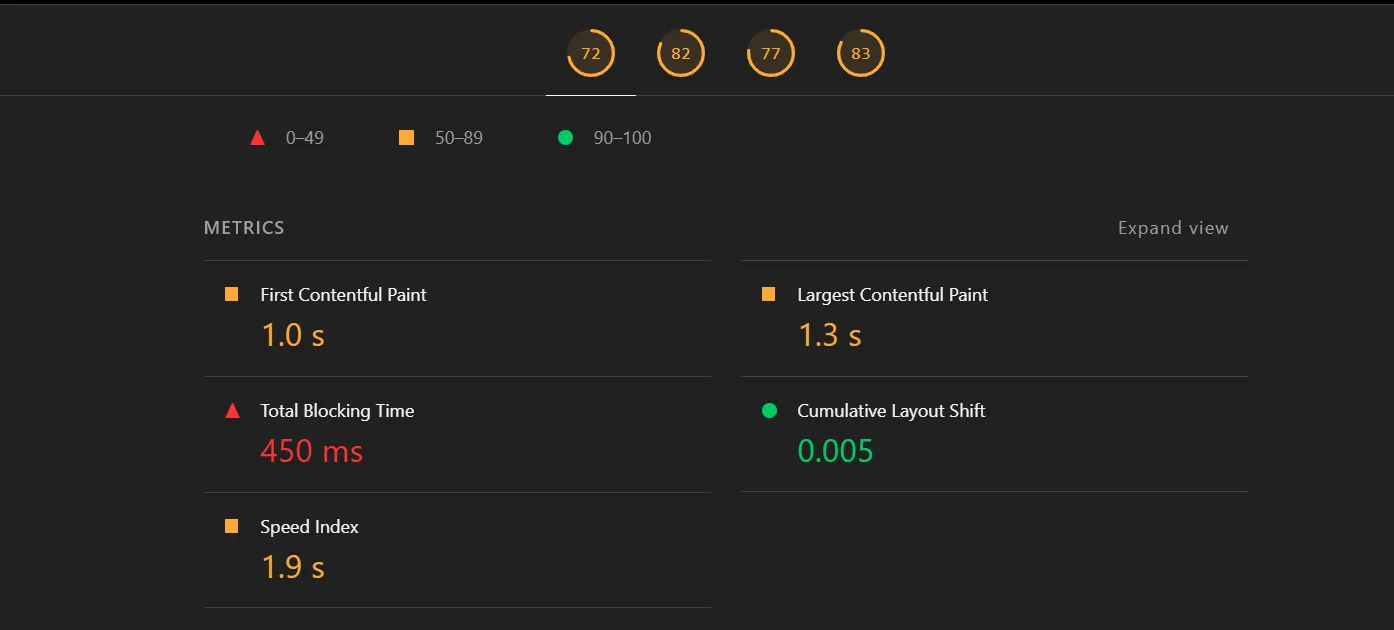
LCP (Largest Contentful Paint) measures loading speed. Specifically, it tracks how long it takes the largest visible element on the page to render fully.
That element is usually a hero image, a large heading, or a banner. If that element takes too long to appear, visitors assume the page is broken and leave. Google wants LCP under 2.5 seconds.
INP
INP (Interaction to Next Paint) measures responsiveness. It tracks how quickly your page responds after a visitor clicks, taps, or types.
Unlike its predecessor, FID, which only measured the first interaction, INP monitors every interaction throughout the page visit.
So if a visitor clicks a dropdown menu, submits a form, or taps a button and nothing happens for half a second, that gets counted against you. Google wants INP under 200 milliseconds.
CLS
CLS (Cumulative Layout Shift) measures visual stability. It tracks how much the page layout shifts as it loads.
You have experienced this before: you go to tap a button, the page shifts, and you accidentally tap an ad instead. That shift has a score.
Images without defined dimensions, late-loading fonts, and dynamically injected content are the usual culprits. Google wants CLS under 0.1.
Together, the three cover the full picture: did the page load visually, did it respond when touched, and did it stay stable while doing both?
| Metric | What It Measures | Good Score |
| How fast does the main visual loads | How fast does the main visual load | Under 2.5 seconds |
| INP | How fast the page responds to clicks | Under 200 milliseconds |
| CLS | How much the layout shifts while loading | Under 0.1 |
Audit Your Site Before You Touch Anything
Most people run one speed test on their homepage, see a decent number, and move on. That approach misses a lot. Here is a more reliable setup.
First, always test both the mobile and desktop tabs in PageSpeed Insights, not just desktop. Google uses mobile-first indexing. Your mobile score is the one that affects your ranking.
Second, run Lighthouse in an Incognito window. Your browser extensions inflate scores in regular mode.
Third, test three specific page types: your homepage, a blog post with images, and a category or product page. Each page type loads different resources and will surface different problems.
Why Your PageSpeed Score Lies to You
Here is something uncomfortable: a score of 95 can coexist with real users bouncing off a frozen page. This happens because PageSpeed Insights produces two types of data: lab data and field data.
Lab data is a synthetic test run in a controlled environment. Field data comes from real Chrome users. To see how real users experience your site, open Google Search Console and check the Core Web Vitals report.
The report pulls from the Chrome User Experience Report (CrUX), which logs real-world interactions.
How to Find the Biggest Problem in Under 5 Minutes
PageSpeed Insights has a Diagnostics section below the score. Start there.
It tells you which metric is failing and gives you a prioritized list of what to fix.
Rather than fixing everything at once, use this quick decision tree to find your starting point:
Is your TTFB over 600ms? Start with hosting. Is your INP over 500ms? Start with JavaScript. Are images flagged? Start with image optimization.
Site-wide INP problems usually point to a theme or plugin issue, not a single page. In contrast, single-page LCP issues usually indicate that a single unoptimized hero image is slowing things down.
How to Speed Up Your WordPress Speed
1) Fix Your Hosting

You have implemented every other optimization, yet your WordPress site still loads slowly. Cheap hosting often does not include a caching plugin, CDN, or image compressor.
The reason comes down to a metric called Time to First Byte (TTFB). TTFB measures how long it takes your server to respond before the browser can start loading anything.
Shared hosting typically delivers TTFB of 400-800ms under normal traffic.
Quality-managed WordPress hosting typically delivers TTFB of 80-200ms.
That 400ms gap is something frontend tricks cannot close.
2) Get a CDN
A Content Delivery Network (CDN) copies your static files to servers around the world. When a visitor loads your site, the CDN serves those files from the server closest to them.
This reduces the physical distance data has to travel, which directly cuts load time. For international visitors, a CDN can reduce load times by 40-60%.
Beyond speed, CDNs also reduce strain on your origin server during traffic spikes. They also provide an added layer of protection against DDoS attacks.
Cloudflare is the best starting point for most site owners. The free tier is genuinely useful. Cloudflare Polish automatically converts and compresses images at the network level.
This means your images get optimized before they even reach the visitor, without any plugin.
3) Set up Caching
WordPress builds each page by running PHP code and querying the database on every request. Page caching skips that process by storing a pre-built HTML version of each page.
When a visitor arrives, the server hands them that file instead of rebuilding the page. This directly reduces TTFB, which directly improves your LCP score.
There are three types of caching, and most guides treat them as the same thing. Page caching stores full HTML pages. Browser caching tells visitors to store files locally.
Object caching saves database query results. Each one fixes a different bottleneck, and you often need all three working together.
4) Optimize your Images
Here is the biggest LCP image mistake most site owners make. They upload a 4MB raw photo and rely on WordPress to resize it for display.
That creates a massive file on your server, even if it displays at 600 pixels wide. Always pre-size images to match the actual display dimensions before uploading.
WebP provides 25-35% better compression than JPEG with no visible quality loss. AVIF compresses even further but has slightly lower browser support as of 2026.
For most sites today, WebP is the right default format. AVIF is worth testing if you want to go further.
Plugins like Imagify and ShortPixel can automatically bulk-convert your existing image library. You do not have to manually re-upload anything. The plugin handles conversion in the background.
5) Implement Lazy Loading
Lazy loading delays images below the fold until a visitor scrolls near them. It reduces the initial page weight and speeds up the loading of above-the-fold content. That is generally a good thing.
There is one important exception, though: your hero image at the top of the page. The hero image is almost always your LCP element. Lazy loading delays the most important visual.
Instead, add the fetchpriority=”high” attribute directly to your LCP image tag. This tells the browser to load that image before almost everything else on the page.
6) Optimize Your JavaScript Code
Page builders like Elementor make the visual design process accessible to people with little to no coding experience. However, this simplicity comes at a significant performance tradeoff.
Page builders often add unzipped code to a WordPress installation. On top of this, every animation, widget, and styling option adds more CSS, JavaScript, and HTML code.
All that additional code competes with the browser’s main thread on each page load, directly harming Core Web Vitals.
LCP suffers from render-blocking resources. INP suffers from JavaScript on the main thread. CLS suffers from layout recalculations as builder CSS loads in pieces.
Start by switching to a lightweight theme with minimal JavaScript footprints, such as Kadence or the native WordPress block editor.
Next, implement the Defer and Async attributes to change WordPress’s behavior. Defer tells the browser to wait to execute a script until HTML parsing is complete. Async downloads the script in parallel but executes it immediately when ready, interrupting the parser.
Finally, delete or disable scripts on specific pages or post types. Some of the most notorious third-party scripts that cause the most INP damage on WordPress include:
- Live chat widgets that load a full JavaScript application on every page
- Marketing automation tags from tools like HubSpot or Intercom
- Social sharing buttons that load separate scripts for each network
- Embedded YouTube videos without a “facade” placeholder, replacing them at load time
7) Optimize Mobile Performance
Optimizing your WordPress website’s performance on mobile devices is a must in 2026. Responsive images with the srcset attribute let you serve different image sizes based on screen width.
A 2,000-pixel-wide desktop image served to a mobile screen is pure wasted bandwidth. With srcset properly configured, a mobile visitor gets a 600-pixel image instead.
Another often-skipped tactic: lower-quality media for slow network connections. Network-aware loading detects connection speed and serves a compressed version to 3G users. This keeps your mobile LCP fast even for visitors on weaker connections.
On mobile devices, buttons and links that are too small often lead to accidental taps and misses. Repeated failed taps are counted as slow interactions, raising your INP score.
Google recommends a minimum touch target size of 48 by 48 pixels for interactive elements.
8) Clean up Your Database
A fresh WordPress install has a clean, fast database. A two-year-old WordPress site usually does not. Over time, WordPress stores every post revision, expired transients, orphaned metadata, and spam comments.
Proper database cleanup can reduce query time by 50-70% on older sites.
That directly improves TTFB, which, in turn, improves LCP. WP-Optimize and Advanced Database Cleaner both handle scheduled cleanup automatically.
9) Control What Plugins Load and Where
Most WordPress plugins load their CSS and JavaScript files on every page of your site.
It’s completely wasteful to load a contact form plugin’s scripts on a blog post page, since visitors will never interact with the form.
Perfmatters Script Manager lets you disable specific plugin assets on specific pages. You can use these third-party tools to remove unnecessary script loads from your per-page weight.
10) Implement WordPress Features
WordPress 6.8 shipped a native feature called Speculative Loading, and most site owners have not touched it. It works by predicting which links a visitor is likely to click next and loading those pages early.
There are two modes: prefetch and prerender. Prefetch downloads the resources for the next page but does not render them yet. Prerender goes further by fully rendering the next page in the background before the click.
Switching from prefetch to prerender mode can deliver measurable INP improvements with no code changes.
Recent WordPress versions now automatically add width and height attributes to images. When a browser knows an image’s dimensions before loading, it reserves space in advance.
The page layout does not jump around. Your CLS score improves without any manual work.
Conclusion
WordPress speed optimization in 2026 isn’t a single big fix. It is a sequence of smaller ones.
Start with hosting and TTFB. Then move to caching, images, and JavaScript.
The sites that win in Google search and convert visitors are not the ones with perfect scores. They are the ones built by people who kept testing, kept measuring, and kept improving.
If you are in the market for managed WordPress hosting, Truehost has great plans for you. The in-house team of WordPress developers will optimize your website speed for you, giving you the best upper hand to conquer the search rankings.