 Domain SearchSecure your perfect UAE domain in seconds.
 Domain TransferSeamless domain transfer. Zero downtime, complete control.
 All TLDsSecure your ideal domain. Explore local UAE and international extensions.
 WHOIS LOOKUPCheck domain ownership, expiry dates, and registrar details instantly.
 AE DomainRegister a .AE domain and build trust in the UAE.
 SSL CertificatesProtect your site with trusted SSL Certificates to secure data and build customer confidence.
 .com DomainGet the world’s most trusted domain and build credibility from day one.
 Web hostingFind budget-friendly hosting that doesn’t compromise on performance.
 Windows HostingHigh-performance hosting for Windows applications and websites.
 Affiliate ProgramBecome a partner and earn commission for every referral.
 WordPress HostingBlazing-Fast WordPress Hosting, Optimised for Performance.
 Email HostingSecure your communications with professional email hosting. Use your domain, stay in control.
 Reseller HostingLaunch your own hosting brand. We handle the tech, you grow your business.
 cPanel HostingHosting supported by cPanel (simple and user-friendly)
 VPS HostingVirtual servers that grow with you. Full root access. Blazing fast performance.
 Managed VPS HostingNot a tech expert? Let us handle everything with our fully managed VPS hosting.
 Dedicated ServersEnjoy full access and total control over your dedicated physical server.
 AI Website BuilderBuild beautiful websites instantly with AI.
 Online ShopCreate a professional online store. No coding needed.
 Web Design ServicesGet a custom website built for your brand and your goals.
 BlogDiscover resources on web hosting, e-commerce, digital marketing, and beyond.
 Contact UsWe are available 24/7 via chat or email
 SupportExplore guides and answers for all our services
Every time you visit a website in the UAE, one invisible system decides if it loads. That system is the Domain Name System, or DNS.
Most business owners have never heard of it. Yet every click, email, and online transaction depends on it working correctly.
DNS translates domain names into IP addresses. That is its entire job.
When DNS fails, your website goes offline. When DNS is slow, customers leave before the page loads. Also, when DNS is attacked, hackers redirect your users to fake sites without touching your server.
The UAE Signals Intelligence Agency now treats DNS security as a mandatory control for critical sectors. Ignoring DNS puts your business and your compliance record at risk.
This guide covers what the Domain Name System does, how it works in the UAE, what records to configure, and how to protect your domain in 2026. No jargon. No padding. Just what you need.
How DNS Works: The 5-Step Resolution Process
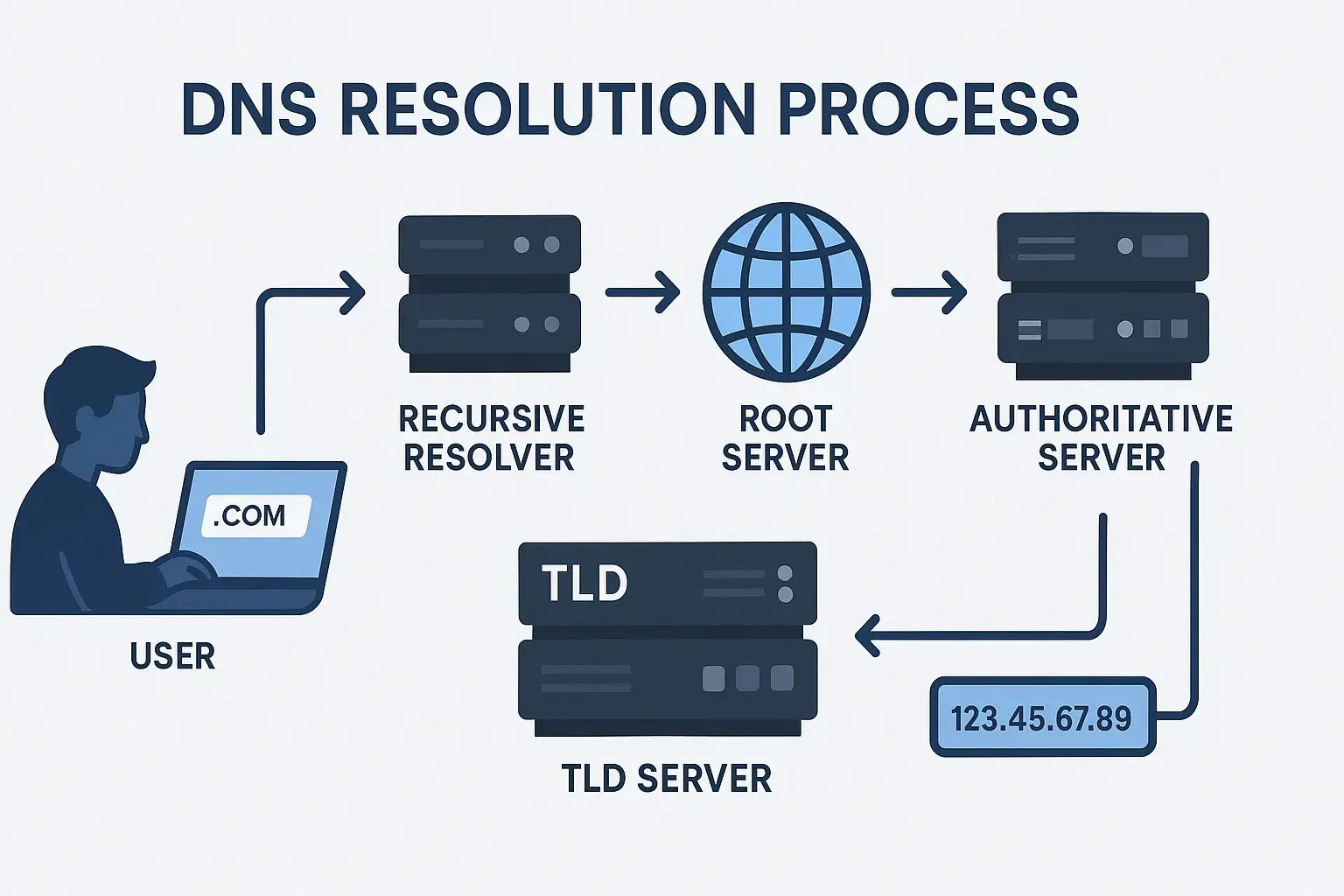
DNS resolution looks complex from the outside. The process is actually a series of five predictable steps.
Each step happens in milliseconds. Here is exactly what occurs when you type a domain name into your browser.
Step 1: Your Browser Checks Its Local Cache
Your browser does not contact any server at first. It checks its own local DNS cache.
If your device has recently visited that domain, the IP address is stored locally.
The cache check takes fractions of a millisecond. If the address is found and the TTL has not expired, the browser connects directly.
TTL stands for Time to Live. It is a number set by the domain owner that tells resolvers how long to store a record.
A TTL of 3600 means the record stays cached for one hour. A short TTL of 300 seconds, which is five minutes, means records refresh more often. Short TTLs are particularly helpful during website migrations.
If you recently moved your UAE hosting provider and some users still see the old site, it’s because the TTL is still valid.
Step 2: The Recursive Resolver Takes Over
If your cache has no record, the query goes to a Recursive Resolver. In the UAE, this is often operated by your ISP, such as e& (Etisalat) or du.
You can also use a public resolver such as Cloudflare 1.1.1.1 or Google 8.8.8.8. The resolver acts like a librarian. It does not hold the answer itself.
It knows exactly where to look. Cloudflare’s 1.1.1.1 resolver averages around 14 milliseconds globally.
Switching from a sluggish ISP resolver to a quicker public one measurably improves your site’s Time to First Byte (TTFB).
Step 3: Root Nameservers Set the Direction
If the resolver has no cached answer, it contacts a Root Nameserver. There are 13 logical Root Nameserver addresses operating globally.
Organizations, including ICANN and Verisign, operate them. Thousands of physical Anycast servers back them up globally.
Root servers do not know the IP address for your domain. They only know where to send the resolver next, based on your TLD.
For .ae domains, the root server directs the query to TDRA’s TLD nameservers.
Step 4: TLD Nameservers Narrow the Search
The TLD nameserver handles all domains under a given extension. For .ae, this is operated by TDRA, the Telecommunications and Digital Government Regulatory Authority.
For .com domains used by UAE businesses, Verisign runs the TLD servers. The TLD server does not know your site’s exact IP either.
It knows which Authoritative Nameserver is responsible for your specific domain. It points to the resolver there.
A helpful way to picture the hierarchy: the Root server is a country directory, the TLD server is a city directory, and the Authoritative server is the specific address.
Step 5: The Authoritative Nameserver Delivers the Answer
The Authoritative Nameserver is the final stop. It holds your domain’s actual DNS zone file. That file contains all of your A, CNAME, MX, and TXT records.
The Authoritative Nameserver reads the correct record and returns the IP address to the resolver. The resolver caches that IP for the duration of the TTL.
Your browser then connects to the web server at that IP. The page loads. The entire five-step process takes between 20 and 120 milliseconds on UAE networks.
DNS Record Types: What Each One Does for Your UAE Business
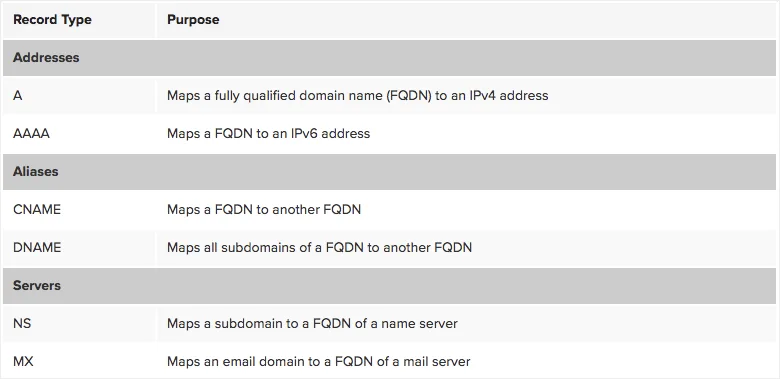
DNS is more than a lookup system. It stores multiple record types, each with a distinct purpose. Knowing which records you need saves hours of troubleshooting later.
A and AAAA Records: Pointing to Your Web Server
The A record is the most basic DNS record. It maps your domain name to an IPv4 address. For example, yourbrand.ae maps to 203.0.113.5. Every domain that hosts a website needs an A record.
The AAAA record does the same thing for IPv6 addresses. Both e& and du have deployed IPv6 at scale across their mobile networks in the UAE. If your server supports IPv6, configuring an AAAA record improves compatibility for mobile users.
You can check your current A record at any time. Open your terminal and type nslookup yourdomain.ae. Free tools such as MXToolbox show this at a glance.
MX Records: Making Business Email Work
MX records tell the internet which server handles email for your domain. Without MX records, no one can send emails to [email protected]. Each MX record carries a priority number.
Lower numbers mean higher priority. Setting two or more MX records creates redundancy. If the primary mail server fails, the backup takes over automatically.
If your UAE business uses Microsoft 365 or Google Workspace, your registrar must point MX records to the correct mail servers.
Your registrar handles this in the domain name system control panel. Incorrect MX records are the most common reason business emails go missing.
CNAME, TXT, NS, and SOA Records
CNAME (Canonical Name): A CNAME record creates an alias. It points one domain name to another. For example, www.yourbrand.ae can point to yourbrand.ae. CNAME records cannot be placed at the bare domain apex. Use an A record there instead.
TXT Record: TXT records store plain text data. They have three main uses for UAE businesses.
SPF records prevent email spoofing. DKIM records authenticate outgoing email.
DMARC policies tell receiving servers what to do with failed authentication checks. Getting these three right is a significant factor in your emails reaching inboxes instead of spam folders.
NS Record: NS records identify which nameservers are authoritative for your domain. Changing your NS records is how you transfer DNS management from one provider to another without moving the domain registration itself.
SOA Record: The Start of Authority record is metadata. It identifies the primary nameserver for the zone and holds administrative information such as serial numbers. Your registrar manages this automatically.
Why DNS Performance Matters More in the UAE
The UAE ranked first globally for mobile internet speed in mid-2025. Median mobile download speeds reached 614 Mbps.
Fixed broadband median speeds sat at approximately 327 Mbps (DataReportal, 2026). At those speeds, DNS resolution time is the most noticeable bottleneck.
A slow resolver adding 200 milliseconds to every query is clearly felt on a 614 Mbps connection.
UAE businesses should use Cloudflare 1.1.1.1 or Google 8.8.8.8 as secondary resolvers.
For authoritative DNS, providers such as Cloudflare and AWS Route 53 run Anycast-enabled networks.
Both have Points of Presence in the Middle East. This reduces authoritative DNS query times to under 20 milliseconds for users in the UAE.
DNSSEC: What It Is and Why UAE Regulators Now Expect It
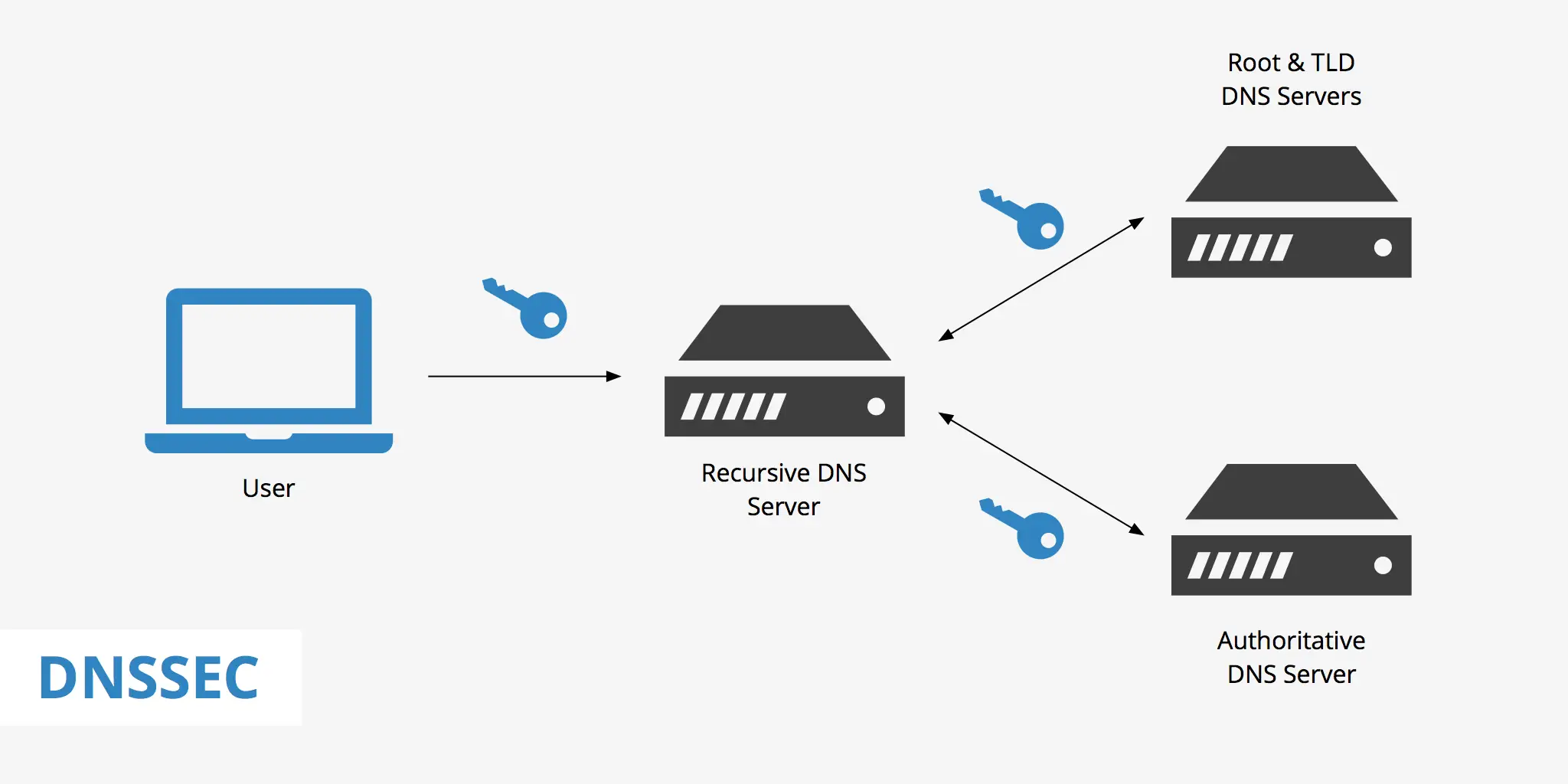
DNSSEC adds cryptographic signatures to DNS records. A resolver can verify that the response it received came from the correct authoritative server and was not modified in transit.
Without DNSSEC, cache poisoning attacks are difficult to detect at the DNS level.
The UAE’s Signals Intelligence Agency (SIA, formerly NESA) Information Assurance Standards require cryptographic controls for critical infrastructure.
DNSSEC satisfies this requirement for DNS record integrity. From March 2026, global Certificate Authorities began requiring DNSSEC validation before issuing TLS certificates for DNSSEC-enabled domains.
The practical effect: enabling DNSSEC is no longer a choice for businesses that need valid HTTPS certificates on DNSSEC-enabled domains.
Frequently Asked Questions About DNS in the UAE
Does DNS Affect Website SEO in the UAE?
Yes, directly. DNS resolution time contributes to Time to First Byte (TTFB). TTFB is a Core Web Vitals signal that Google uses in ranking decisions. Slow DNS produces poor TTFB. Poor TTFB results in lower scores in Google’s Lighthouse performance audit.
Managed domain name system providers with Anycast networks significantly reduce resolution time. Cloudflare and AWS Route 53 both have points of presence in the Middle East. From UAE networks, resolution times drop to under 20 milliseconds. Slow shared-hosting DNS often adds 100 to 200 milliseconds per query. Check your TTFB data in Google Search Console under the Core Web Vitals report.
Can I Keep My Domain Registered With One Company and Host With Another?
Yes, and separating the two is a better setup. Domain registration and DNS hosting are separate functions. You can register your .ae domain on Truehost, point your NS records to Cloudflare’s free DNS service, and host your site on any server you choose. This avoids vendor lock-in. If you ever need to move hosting, you only need to update the A record in Cloudflare. No registrar change is needed.
What Happens If My DNS Provider Goes Offline?
If your authoritative DNS provider suffers an outage, your entire domain goes unreachable. This affects your website, your email, and any cloud service tied to your domain. This is not a hosting outage. It is a DNS-layer failure that affects all users simultaneously.
Get Started With The Best Domain Registrar Today
Every section of this guide points to the same truth. DNS is not a background detail.
It controls whether your website loads, whether your emails arrive, and whether your brand stays protected from attackers.
Getting the domain name system right starts at registration. The registrar you choose determines how much control you have over your records, how quickly you can make changes, and what support you get when something breaks.
Truehost offers .ae domain registration with full DNS management tools, DNSSEC support, and a control panel built for business owners, not just developers.