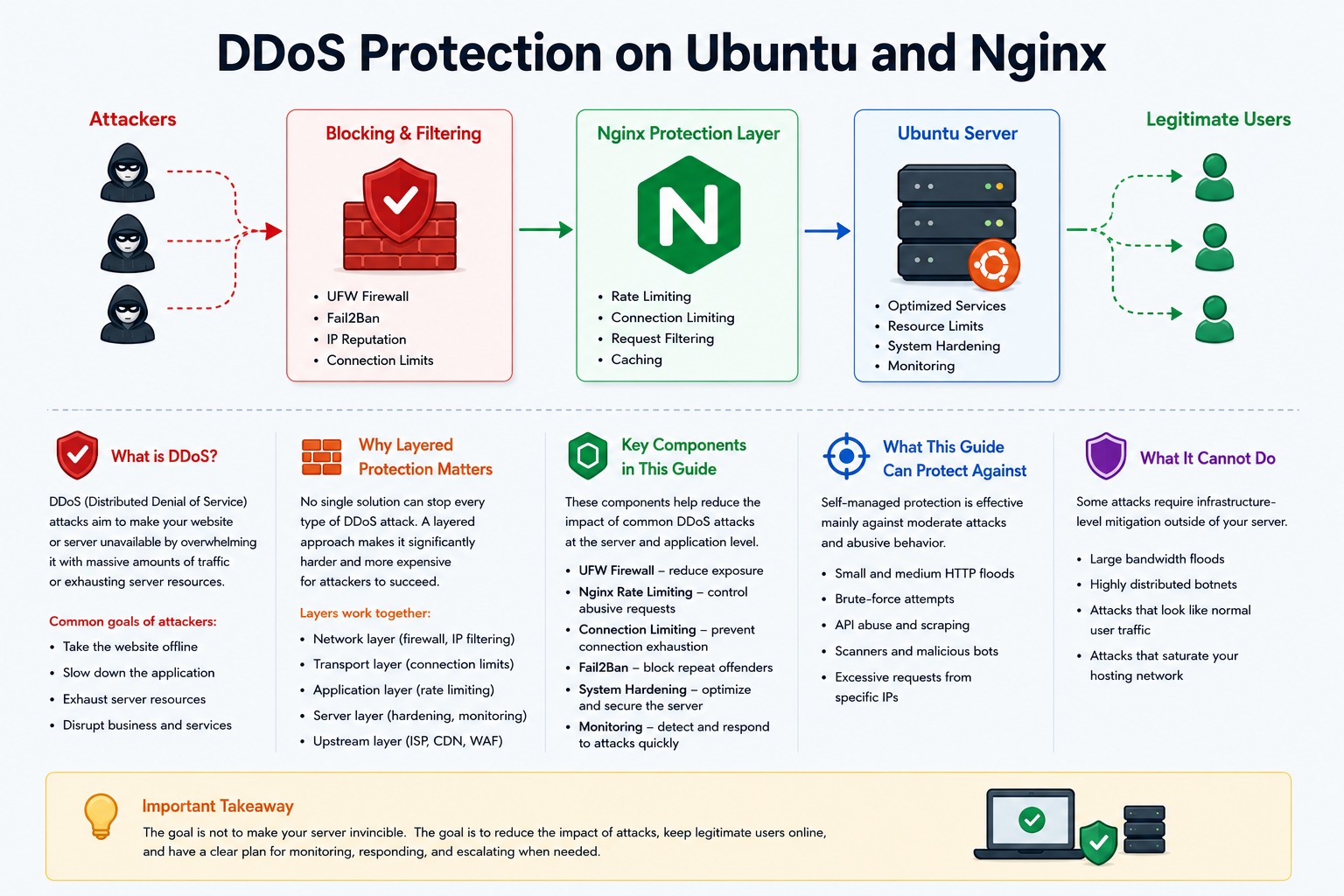
Self-Managed DDoS Protection on Ubuntu and Nginx
DDoS attacks are one of the most common threats for websites, APIs, and online services. Their goal is simple: make a server unavailable by overwhelming it with more traffic, connections, or requests than it can handle. Even a small attack can create serious problems if the server is not prepared, especially when all traffic reaches the application directly.
Ubuntu and Nginx can provide a strong first layer of protection when configured correctly. This does not mean that one server can stop every DDoS attack. Large network-level attacks must usually be filtered by a hosting provider, CDN, or dedicated DDoS protection service. Still, a well-prepared server can reduce the impact of many common attacks and stay stable during moderate abuse.
What DDoS Protection Means in Practice
DDoS protection is not one single setting or one magic tool. It is a layered approach. Each layer handles a different part of the problem: network exposure, connection handling, request filtering, rate limiting, logging, automated blocking, caching, and emergency response.
The main goal is to make abusive traffic less effective while keeping the website available for real users. A good setup should not only block suspicious traffic, but also avoid blocking legitimate visitors by mistake.
What Ubuntu and Nginx Can Help With
Ubuntu provides the operating system layer. It can help control which ports are open, how the server handles connections, and how suspicious traffic can be blocked. Tools such as a firewall and automated banning systems can reduce unwanted access and repeated abuse.
Nginx provides the web-facing layer. It can limit how many requests a client can make, restrict simultaneous connections, protect sensitive endpoints, serve cached content, and reject obviously abusive requests before they reach the application.
Together, Ubuntu and Nginx can help defend against many practical threats, especially application-layer attacks and smaller HTTP floods.
Types of Attacks This Setup Can Reduce
A self-managed setup is especially useful against attacks that target the web application rather than the entire network connection. These attacks often try to overload login pages, API endpoints, search pages, admin panels, or dynamic content.
- Repeated login attempts.
- API request floods.
- Bot traffic and scanners.
- Slow clients that keep connections open.
- Excessive requests from one IP address or a small group of IP addresses.
- Traffic spikes from poorly configured crawlers.
- Requests to expensive dynamic pages.
These attacks can often be reduced with connection limits, request limits, firewall rules, automated bans, and caching.
Limits of Self-Managed Protection
It is important to understand the limits of this approach. If an attack is large enough to saturate the server’s network connection, Nginx will not be able to help because the traffic may never reach the web server in a usable way. In that case, filtering must happen before the traffic reaches the machine.
Self-managed protection is also less effective against very large botnets where each individual IP sends only a small amount of traffic. These attacks can look similar to normal user behavior, which makes simple IP-based blocking less reliable.
For high-risk projects, self-managed protection should be combined with a CDN, provider-level filtering, a Web Application Firewall, and application-level security controls.
Firewall as the First Layer
A firewall is the first basic layer of server protection. It reduces the number of services exposed to the internet. For a typical web server, only the necessary ports should be open, such as web traffic and secure administrative access.
Firewall rules do not stop every DDoS attack, but they reduce the attack surface. They also prevent forgotten or unnecessary services from becoming entry points for abuse.
If the website is behind a CDN or reverse proxy, the firewall can sometimes be configured to accept web traffic only from trusted proxy IP ranges. This can prevent attackers from bypassing the CDN and hitting the origin server directly.
Nginx Rate Limiting
Rate limiting is one of the most useful Nginx features for DDoS mitigation. It controls how many requests a client can make within a certain period. When a client sends too many requests too quickly, Nginx can slow down or reject those requests.
Rate limiting is especially useful for login pages, API routes, search endpoints, and other dynamic areas of a website. These pages often consume more server resources than static content, so they should usually have stricter limits.
The key is balance. If limits are too loose, they may not stop abuse. If they are too strict, real users may be blocked, especially users behind shared networks, mobile carriers, corporate offices, or public Wi-Fi.
Connection Limiting
Connection limiting controls how many simultaneous connections a single client can keep open. This is useful against clients that open many connections and hold them for a long time.
Some attacks do not rely on sending many requests quickly. Instead, they try to consume available connection slots. By limiting concurrent connections, Nginx can reduce the impact of this behavior and keep resources available for normal users.
Protecting Expensive Endpoints
Not all pages have the same cost. A static image is usually cheap to serve, while a login request, search query, checkout request, or API call may require database access, authentication checks, or other expensive application logic.
For this reason, sensitive and expensive endpoints should receive special attention. They may need stricter request limits, additional validation, caching where possible, or application-level protection.
- Login pages.
- Registration forms.
- Password reset pages.
- Search pages.
- API endpoints.
- Admin panels.
- Checkout and payment flows.
Protecting these areas can significantly reduce the chance that an attacker overloads the application with a relatively small amount of traffic.
Real Client IP Behind a Proxy
Many websites use a CDN, load balancer, or reverse proxy in front of Nginx. In this case, the server may see the proxy’s IP address instead of the real visitor’s IP address. This can create problems for rate limiting and logging.
If Nginx does not know the real client IP, it may apply limits to the proxy itself. As a result, many legitimate users can be affected at once. Correct Real IP configuration is therefore essential when the server is behind another layer.
Real IP handling should only trust known and verified proxy addresses. The server should not blindly trust client-supplied headers from the open internet.
Automated Blocking with Fail2Ban
Fail2Ban is commonly used to detect repeated suspicious behavior in logs and temporarily block offending IP addresses. It can help against brute-force attempts, scanners, repeated errors, and clients that constantly trigger rate limits.
Fail2Ban is not instant protection against massive attacks. It reacts after suspicious behavior appears in logs. However, it is very useful for reducing repeated abuse and cleaning up background noise from bots.
Used together with Nginx logs and firewall rules, Fail2Ban can become an effective automatic response layer for common low-level attacks.
Caching as DDoS Mitigation
Caching is one of the most effective ways to improve resilience. When Nginx can serve cached content directly, the application and database do not need to work for every request.
This is especially helpful during traffic spikes. Even if many users request the same page, cached responses can be served quickly with much lower resource usage.
Caching should be used carefully. Public pages, static files, and anonymous content are good candidates for caching. Private user pages, account areas, shopping carts, and personalized dashboards require special care to avoid exposing sensitive information.
Monitoring and Logs
Monitoring is essential because DDoS protection is not only about blocking traffic. It is also about understanding what is happening during an incident.
Useful monitoring includes request volume, top client IPs, most requested URLs, response codes, active connections, CPU usage, memory usage, network traffic, and application response time.
Logs help answer important questions: Is the attack coming from a few IPs or many? Is it targeting one endpoint or the whole site? Are users receiving errors? Is Nginx overloaded, or is the backend application the real bottleneck?
Incident Response Planning
A clear incident response plan is just as important as technical configuration. During an attack, there may not be time to decide what to check first. A prepared checklist helps the team respond faster and avoid mistakes.
A basic response plan should include checking server load, reviewing logs, identifying targeted endpoints, tightening temporary limits, blocking obvious abusive sources, and contacting the hosting provider if the network is saturated.
For serious attacks, upstream escalation is critical. Hosting providers and CDN services can often filter traffic before it reaches the server, which is the only effective option for large volumetric attacks.
Common Mistakes
- Relying only on one tool instead of using layered protection.
- Setting rate limits too strictly and blocking real users.
- Forgetting to configure the real client IP behind a CDN or proxy.
- Assuming a firewall alone can stop application-layer attacks.
- Expecting Fail2Ban to stop large attacks instantly.
- Caching private pages without proper rules.
- Ignoring logs and monitoring until an incident happens.
- Having no plan for provider or CDN escalation.
Best Practices
- Use several layers of protection instead of relying on one setting.
- Keep only necessary ports open.
- Apply stricter limits to expensive endpoints.
- Use caching for public content.
- Configure Real IP correctly when using a proxy or CDN.
- Monitor logs and server metrics regularly.
- Start with conservative limits and adjust them based on real traffic.
- Prepare an escalation plan for large attacks.
Conclusion
Self-managed DDoS protection on Ubuntu and Nginx is about building a practical first line of defense. It cannot replace upstream protection for large network attacks, but it can significantly reduce the impact of many common forms of abuse.
A strong setup combines firewall rules, connection limits, request rate limits, endpoint-specific protection, correct client IP handling, automated blocking, caching, monitoring, and a clear incident response plan. To test the strength of your own protection, you can buy DDoS attack here.
The best protection is balanced. It should make attacks less effective without making the website difficult to use for legitimate visitors. With the right layered approach, Ubuntu and Nginx can provide a reliable foundation for keeping a website available during moderate DDoS activity.